Conversion rate calculator
Enter your visitors and your conversions to get your conversion rate and the range it could really sit in. Add your average order value to see revenue, and test what a lift would be worth.
Your conversion rate
How the calculator works
Conversion rate is the share of visitors who did the thing you wanted:
conversion rate = conversions ÷ visitors × 100
The example button uses 12,000 visitors, 300 conversions, an average order value of 40 and a 10% lift. Worked by hand:
- Rate: 300 ÷ 12,000 × 100 = 2.50%, or 1 conversion for every 40 visitors.
- Revenue: 300 × 40 = 12,000. Divide by visitors and each visitor was worth 1.00 on average.
- A 10% lift: 2.50% × 1.10 = 2.75%. On the same 12,000 visitors that is 330 conversions, so 30 more, worth 30 × 40 = 1,200.
The calculator also shows a likely range for your rate (95%, using the Wilson score interval). Your 300 conversions are one sample of what the page does, not a fixed truth about it. With 12,000 visitors the range is about 2.24% to 2.79%. With 1,200 visitors and 30 conversions the rate is still 2.50%, but the range widens to roughly 1.76% to 3.55%. The fewer visitors you have, the less one number tells you.
The range assumes each visitor is counted once and either converts or doesn't. If you count conversions per session, or one visitor can buy several times, treat it as a rough guide.
Relative lift or percentage points
People use both, and they differ a lot. A relative lift multiplies your current rate, so 10% on 2.00% gives 2.20%. A percentage point lift adds to it, so 1 point on 2.00% gives 3.00%. The second is a 50% relative lift. Pick the one that matches the claim you're checking.
The value of a lift here is extra conversions on the same traffic: visitors × (new rate − current rate). It doesn't assume you'll get more visitors, and it can't tell you whether a change will really produce the lift. It shows what the lift would be worth if it did.
Why conversion rates differ by traffic source
One overall conversion rate is an average of very different groups of people. They differ because:
- They arrive with different intent. Someone who searched for what you sell is closer to buying than someone who tapped a link while scrolling.
- They already know you, or they don't. A newsletter reader has heard from you before. A first visit from a post hasn't.
- The landing page matches the promise, or it doesn't. A link that promises one thing and lands on another loses people.
- Device and moment differ. Phones, desktops, evenings and lunch breaks each behave differently.
The made-up numbers below show why it matters. Every channel is simple arithmetic: conversions ÷ visitors.
| Channel | Visitors | Conversions | Rate | Revenue at 40 an order | Per visitor |
|---|---|---|---|---|---|
| Search | 6,000 | 120 | 2.00% | 4,800 | 0.80 |
| Newsletter | 1,500 | 75 | 5.00% | 3,000 | 2.00 |
| Social | 4,500 | 45 | 1.00% | 1,800 | 0.40 |
| All traffic | 12,000 | 240 | 2.00% | 9,600 | 0.80 |
Example numbers, not real data and not a benchmark. They're here to show the working.
The blended 2.00% hides a 5-to-1 gap between the newsletter and social. It also means a rise in your overall rate can come from a change in the mix of visitors, with no change in how any one channel performs. So work it out per channel, and compare a channel with itself over time before comparing it with anyone else's number.
What to do with the number
- Fix the definition first. Decide what a conversion is and count visitors and conversions the same way every time.
- Check the range before you celebrate. If last month was 2.1% and this month is 2.4%, but both ranges overlap, the difference may be noise. Try the calculator on each month.
- Split by channel. Find which source sends the people who convert, and which sends lots of visitors who don't.
- Add revenue. A channel with a low rate can still earn more per visitor if its orders are bigger. Revenue per visitor puts them on one scale.
- Test the lift you're hoping for. Use the lift box to see what a change has to deliver to be worth the effort.
For the step before the visit, where people see a link and choose whether to click, use the CTR calculator.
Rates and revenue per channel, without the spreadsheet
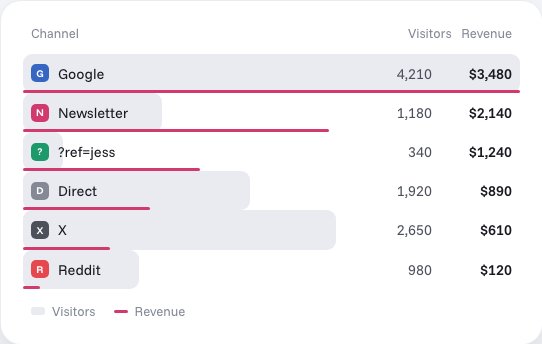
Stickybeak is live analytics for every site you own. It counts goals, and it breaks revenue down by channel, campaign and ?ref= code, with revenue per visitor, so a small channel can win. Visitors and revenue sit side by side for each channel, which is the input this calculator needs.
For goals, add data-goal to any button. Email and phone links count on their own. Send a goal with an amount and it's broken down by channel, campaign and affiliate, with the trail behind each order. Stickybeak is in early access and doesn't have a public price yet.
Questions
How do you calculate conversion rate?
Divide conversions by visitors, then multiply by 100. If 300 of 12,000 visitors bought, that's 300 ÷ 12,000 × 100 = 2.5%.
What counts as a conversion?
Whatever you decide the visit was for: an order, a signup, a booking, a form submission. Pick one definition and keep it the same from month to month, and count visitors and conversions the same way (both people, or both sessions).
What is a good conversion rate?
It depends on what you sell, who visits and where they came from, so a single number from someone else's site is a poor yardstick. A better comparison is your own rate last month, or the same channel before and after a change.
Is a 10% lift the same as 10 percentage points?
No. A 10% relative lift multiplies your rate by 1.1, so 2.00% becomes 2.20%. A 10 percentage point lift adds 10 to it, so 2.00% becomes 12.00%. The calculator lets you pick which one you mean.
Why does my conversion rate differ by traffic source?
Different channels bring different people at different moments. Someone who opened your newsletter already knows you; someone who followed a link in a social post may be browsing. Your overall rate is an average of those groups, so work it out per channel as well.
Does this calculator save what I enter?
No. Everything is calculated in your browser. Nothing you type is sent anywhere or stored.