Check website traffic: your own site, or anyone else's
To check the traffic on your own site, use Search Console and an analytics tool. Search Console shows impressions and clicks from Google Search. Your analytics shows recorded visits from search and other channels. To check someone else's site, a free website traffic checker gives you an estimate, not a count.
Enter any site to see roughly how many visits it gets from Google, the countries they come from and the pages they land on.
TL;DR
- For your own site, use Search Console and an analytics tool.
- Search Console shows impressions and clicks from Google Search; your analytics shows recorded visits from search and other channels.
- For someone else's site, a free website traffic checker gives you an estimate, not a count.
Stickybeak is one script tag, and your site joins a wall that shows every site you own at once. It is in early access.
Get early accessHow much traffic does that site get?
Type any website into our free traffic checker. You'll see roughly how many visits Google sends it, which countries they come from and which pages they land on, played live on a Stickybeak wall.
Try allbirds.complausible.ionomads.com
Free. The three examples open in full, and signing up gets you three more sites.
The short answer
Your own site: add an analytics tag to your pages, wait for visits, then look at four things: visitors, where they came from, which pages they read, and what they did. Setup takes a few minutes. It only counts from the moment it's installed.
Someone else's site: use a public traffic estimator, such as our free website traffic checker, read the number as a rough range, and compare sites of a similar size rather than trusting one figure. Only the site's owner can see the real count. Counts are one thing; who the visitors are is another, and we cover what an owner can and can't see about who visits separately.
The ways to check, side by side
| Way to check | Whose site | What you get | Real count or estimate |
|---|---|---|---|
| Search Console | Yours (you verify ownership) | How often your site appears in Google Search, which searches show it and how often people click | Count, but only for Google Search |
| An analytics tool on your site | Yours | Visitors, sources, pages and conversions from all channels | Count, from the day you install it |
| Stickybeak | Yours | The same, live, with every site you own on one wall and revenue next to visitors | Count, from install. In early access |
| A free traffic checker | Anyone's | Estimated visits, top sources and keywords | Estimate |
| Ask the owner | Someone else's | A screenshot or read-only access to their analytics | Count |
To see another site's recorded visitor count, ask the owner for analytics access or a screenshot. Public traffic checkers provide estimates. To start counting your own, see the best website analytics tools, free and paid. If the number you find on your own site has suddenly fallen, see why your website traffic might be dropping.
Part 1: your own site
Start with Search Console if you want Google's numbers
Google Search Console is free. Once you've confirmed you own the site, its Performance report shows how often your site appears in Google Search, which searches show it and how often people click through, according to Google's help page for the report (read 14 October 2026). It's the quickest way to see "how popular is my site" in search. It only covers Google, though, so it says nothing about visits from email, social or other sites. For those you need analytics on the site itself.
What to measure
Analytics tools can show dozens of numbers. Four answer most questions:
| Measure | The question it answers | What to look for |
|---|---|---|
| Visitors | How many people came? | The trend over weeks, not one day. Unique visitors count people, page views count pages. Splitting them into new vs returning visitors shows who comes back. See unique visitors, users and sessions for why two tools disagree. |
| Sources | Where did they come from? | Search, social, email, other sites, and "direct" (no referrer). A big direct share often hides untagged links. |
| Pages | What did they read? | Your entry pages (where people land) and the pages that lead to a signup or sale. |
| Conversions | Did they do the thing you wanted? | A signup, a sale, a click on a contact link. Traffic that never converts is worth less than it looks. |
If you only have time for one habit, make it the second: sources. Knowing which channel brings people is what tells you where to spend the next hour.
Set up analytics in a few minutes
- Pick a tool. Any web analytics tool works. Check its own pricing and privacy pages before you commit, because they differ.
- Add its tag to every page. Most tools give you one line of HTML to paste into the
<head>of your site, or a setting in your site builder. - Confirm it's receiving visits. Open your own site in another browser, then look for that visit in the tool.
- Leave your own visits out. On a small site your own clicking can be a big share of the traffic. Most tools have a way to exclude your browser or network.
- Tag the links you control. Put
utm_source,utm_mediumandutm_campaignon links in emails and posts, so they don't fall into "direct". - Mark one conversion. Pick the single action that matters and tell the tool when it happens.
- Give it a week. A tool can't count the past. After a few days you have enough to see which sources and pages matter.
Why your numbers may be lower than the real traffic
Some visitors never get counted. Browsers and ad blockers keep lists of known analytics addresses and can stop a tool's script from loading, and a visit that isn't recorded is invisible to you. Bots are the opposite problem: some tools count them as visitors unless they filter them out. This is why two tools can show different numbers for the same site. Pick one as your source of truth and compare it with itself over time.
A worked example in Stickybeak
Stickybeak is live analytics for every site you own. It's in early access. Setup is one script tag, 4 KB, and afterwards the dashboard checks the install for you: it looks for the tag on your homepage and for the first visitor. Any site can use the hosted script, which loads from Stickybeak. Some workspaces can also serve it from their own domain, which needs the domain on Stickybeak's Cloudflare account. Then your site joins a wall that shows every site at once.
- 12 online are on the site right now, active in the last minute.
- 184 in the last 30 min is how many people visited in the last half hour.
- The bars are those 30 minutes, one per minute. The pink one is this minute, still filling.
- Australia 141 and the rest are where those people are.
- Today 1,206 is visitors so far today, against the same time yesterday. The line beside it is daily visitors over the last 30 days.
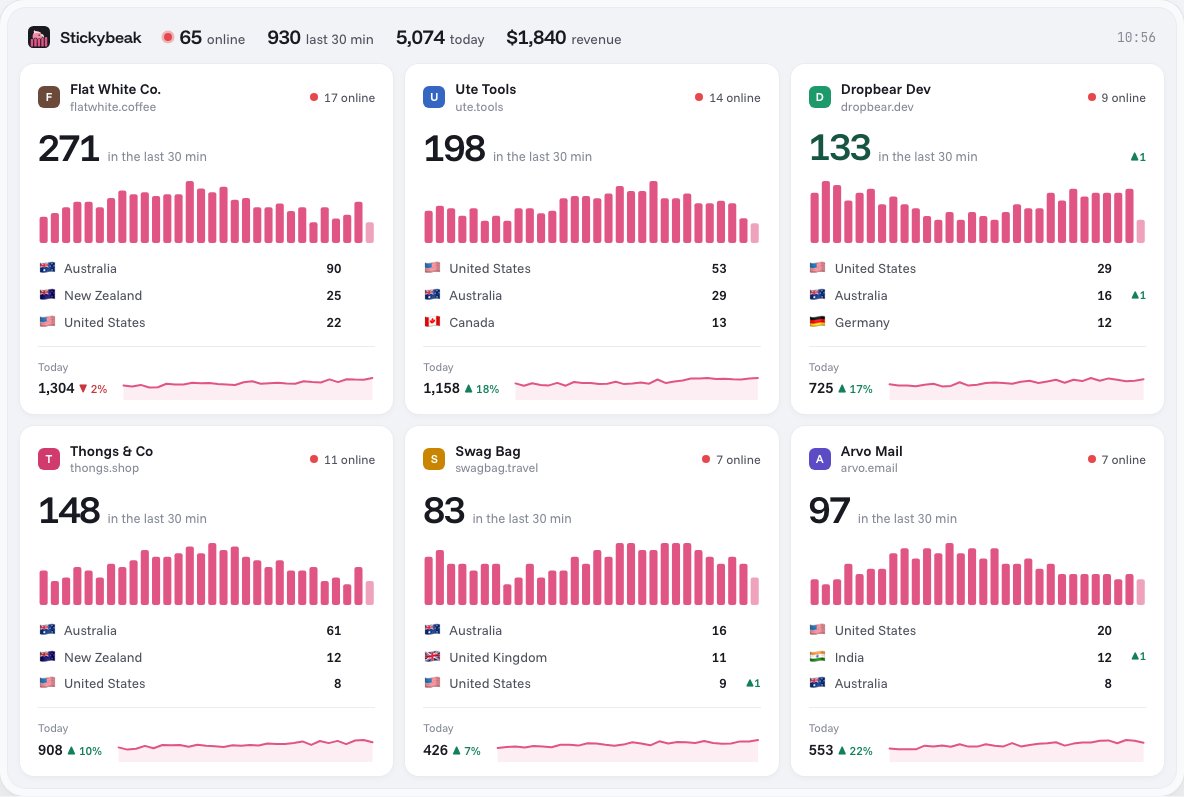
Mapped to the four measures above:
- Visitors: the big number on each card, plus a per-minute chart so you can watch a spike happen. Real-time website analytics explains when a live view is worth having.
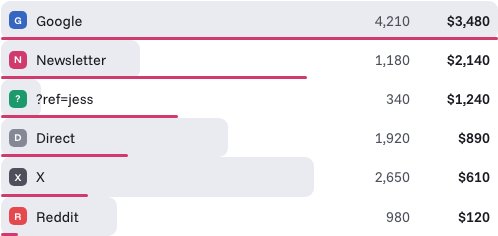
- Sources: you can click a referrer, page, country or device and the whole page filters to it. Revenue is broken down by channel, campaign and
?ref=code. - Pages: top pages sit alongside referrers and countries.
- Conversions: add
data-goalto any button and it counts as a goal. Email and phone links count on their own. Each order keeps its trail: entry page, referrer, every UTM tag, and the pages read before buying.
Two of its choices answer the "lower than real" problem above. Bots, including AI assistants and search engines, are labelled and kept out of visitor numbers, with crawlers that never run JavaScript seen through Cloudflare's data. Where a workspace can serve the script from its own domain, it's not the kind of address ad blockers' lists usually target. That needs the domain on Stickybeak's Cloudflare account. Other sites use the hosted script, which some blockers stop as a third-party script.
To leave your own visits out, run localStorage.setItem("stickybeak:ignore", "true") in your browser's console, and that browser is never counted.
Stickybeak doesn't have a public price yet. If you'd like to try it when there's a spot, leave your email.
Part 2: someone else's site
You can't open another site's analytics, so every public number about it is a guess. Traffic checkers build that guess from some mix of sampled browsing data, search ranking data, and a statistical model. Each tool uses its own sources, which is why you'll see different figures for the same site.
Our website traffic checker estimates any site's visits from Google search, with the countries they come from and the pages they land on, and shows what the site is built and measured with. Like every checker, it only sees search, so treat its figure as a rough size.
Free website traffic checkers people use
These are two well-known ones, described from their own pages as of 14 October 2026. Others exist, and the same caution applies to all of them.
| Checker | What its page says it shows | Worth knowing |
|---|---|---|
| Similarweb | Traffic stats and rankings, traffic sources, top keywords, referring domains and the technologies a site uses | Its page says its data comes from sites sharing their own analytics, a network of anonymous device data, partners and a model over public data. It cites a study reporting 5K to 100K Google Analytics users a month. Free searches are limited per day |
| Ahrefs traffic checker | Search traffic estimates for a site or a page. The same page puts organic and paid splits and keyword data in Site Explorer, a separate Ahrefs tool | It estimates search traffic only, so visits from email, social and direct aren't part of the figure. Its page doesn't spell out the method |
Stickybeak isn't a checker for other people's sites: it only measures a site where its script is installed.
What an estimate can and can't tell you
| Usually possible | Usually not possible |
|---|---|
| A rough order of magnitude: hundreds, thousands, hundreds of thousands | The exact number of visitors in a month |
| Which of two similar sites is probably bigger | A reliable figure for a small site, where there's little data to sample |
| Likely top search terms and pages that rank | Exact counts or reliable attribution for any channel. Some tools estimate email, direct and social traffic too, but those are rougher guesses, and search-only tools skip them |
| Rough trend direction over months | The site's real sales, signups or conversions. Some tools estimate conversions too, but those are modelled figures, not the site's own counts |
How to use an estimate sensibly
- Use two or three checkers, and expect them to disagree. The overlap is more useful than any single number.
- Compare like with like. A checker's error is probably similar across sites of a similar size, so a comparison is sturdier than a headline figure.
- Test it on a site you know. Look up your own site and compare the estimate with your real analytics. That shows you how far off it tends to be for a site your size.
- Look for numbers the site publishes itself. Some sites share a media kit, an open stats page or a public dashboard. That beats any estimate.
- Treat it as a lead, not a fact. Don't quote an estimate as the site's real traffic in a report or a deal.
If the site is a partner, an advertiser or something you're thinking of buying, ask the owner for a screenshot or read-only access to their analytics. It's a normal request, and it's the only way to see the real thing.
Questions
How do I check my website traffic for free?
Add a web analytics tool to your site. Many have a free option, so check the one you're considering. Once its tag is on your pages it counts visits from then on, but it can't show visits from before it was installed.
How do I see how much traffic a website gets?
For your own site, use Search Console for impressions and clicks from Google Search and an analytics tool for recorded visits from search and other channels. For someone else's, use a free traffic checker and read the result as an estimate, or ask the owner for a screenshot of their analytics.
How many visitors does a website get?
There's no single figure. Real visitor counts sit in the site's own analytics, which only its owner can see. Public checkers estimate it, and the estimates are roughest for small sites.
How do I see how many hits a website gets?
Analytics tools count visits and page views rather than hits. On your own site, find visitors and page views in your analytics. For another site, a traffic checker gives an estimate of monthly visits.
How popular is a website?
A traffic checker can show a rough ranking and an estimated monthly visit count. Treat them as a guide to whether a site is big or small, not as a precise measure, and compare it with sites of similar size.
Is there a free website traffic checker?
Yes, several offer a free version with limits. Similarweb's and Ahrefs' traffic checkers both have free versions as of 14 October 2026. They give estimates, not counts, so check the same site in two of them and expect different numbers.
Can I see the exact traffic of any website?
No. Only the site's owner, or someone they give access to, can see real numbers. Public checkers publish estimates built from samples and models, and they're less reliable for small sites.
How accurate are website traffic checkers?
They're estimates. Different checkers often give different numbers for the same site, so use them to compare sites of similar size or to get a rough order of magnitude, not an exact figure.
Why do two analytics tools show different traffic for my site?
Tools count differently. Some filter bots and some don't, some are blocked by ad blockers more often than others, and they define a visit or session differently. Pick one as your source of truth and compare it with itself over time.
Does an ad blocker affect my traffic numbers?
It can. If a visitor's blocker stops your analytics script from loading, that visit isn't recorded, so your numbers can be lower than the number of people who came.
Should I count my own visits?
Usually not. Your own clicks inflate small sites noticeably. Most analytics tools have a way to exclude your own browser or network.