Bounce rate: what it means, what's good, and when it doesn't matter
Bounce rate is the share of visits that ended without the visitor doing anything your analytics counts as engagement. There's no single good number, because the definition changes from tool to tool and the right answer changes from page to page.
Turn your sessions and bounced sessions into a bounce rate and an engagement rate.
TL;DR
- Bounce rate is the share of visits that ended without the visitor doing anything your analytics counts as engagement.
- The definition changes from tool to tool, so a rate from one tool can't be set against a rate from another.
- There's no single good number, because the right answer changes from page to page.
Stickybeak shows bounce rate and session time, and you can filter by referrer, page, country or device. It is in early access.
Get early accessWhat is bounce rate?
Someone lands on a page, and then the visit ends. If your analytics tool judges that visit as not engaged, it's a bounce. Bounce rate is bounces divided by visits, as a percentage. To work yours out from your own counts, use the bounce rate calculator.
A worked example with made-up numbers: a page gets 200 visits in a week and 130 of them are counted as bounces. The bounce rate is 130 / 200 = 65%.
The catch is the phrase "counted as engaged". Each tool decides that for itself, so a bounce rate from one tool can't be set against a bounce rate from another. Visits are counted differently from tool to tool as well: see unique visitors, users and sessions.
Why the same page has different bounce rates in different tools
| Tool | A visit is not a bounce if it... |
|---|---|
| Google Analytics 4 | lasts longer than 10 seconds by default (or your configured engagement threshold), has a key event, or has 2 or more page or screen views. Bounce rate is the percentage of sessions that were not engaged. |
| Plausible | views more than one page or triggers a custom event. Events marked non-interactive don't count. |
Both definitions come from each tool's own documentation, checked on 8 October 2026 (links at the bottom). Tools can change them, so check the current documentation for yours.
In GA4, bounce rate is the flip side of engagement rate. Engagement rate is the percentage of sessions that were engaged, and bounce rate is the percentage that weren't, so the two add up to 100%. If a page has a 70% engagement rate, its bounce rate is 30%.
Notice what that does to a one-page visit. In GA4, a visitor who reads a single page for a minute isn't a bounce, because the session lasted longer than 10 seconds, the default engagement threshold (you can change it in your Google tag settings). In Plausible, the same visit is a bounce unless the visitor views another page or triggers an event. Same visitor, same minute, different number.
What is a good bounce rate?
We don't quote an industry average here. Published benchmarks mix tools with different definitions, so a 60% from one source doesn't mean the same as a 60% from another. What's more useful is what the page is for.
| Page type | What a high bounce rate usually means | Worry? |
|---|---|---|
| Blog post or guide | The visitor read the answer and left. That can be a success. | Only if you wanted them to go on to something |
| Contact or opening hours | They got the detail they came for. | Rarely |
| Home page | The page didn't make a next step obvious, or the visitor wasn't the right one. | Yes, look closely |
| Product, pricing or landing page | The page didn't match what they expected, or it's slow or broken on their device. | Yes |
| Checkout steps | Bounce rate says little here. It measures session engagement, and a visitor who reached checkout from another page is already engaged, even if they abandon. | Measure abandonment with funnel drop-off or exits at each step instead |
So the useful comparisons are your own: the same page last month, the same page by traffic source, or two pages that do a similar job. A page that jumps from 45% to 70% after a change is a better lead than any average. Time on site has the same problem, covered in average session duration.
When bounce rate doesn't matter
- The page is the answer. A visitor who finds a phone number, a recipe or a definition and leaves has been served.
- Very few visits. Ten visits and six bounces is 60%, but one more visit moves it by several points. Wait for more data.
- You're comparing across tools. See the table above.
- The visitor came back later. A bounce on Monday followed by a purchase on Thursday is two visits, and only the second is a sale.
How to find out why a bounce rate is high
Work through these in order. Each one rules out a cause.
- Check it's measured properly. If the analytics tag fires twice on a page, or a single-page app doesn't report page changes, bounce rate can look wrong. Test one visit yourself and see what it records.
- Split it by source. One channel with a very high bounce rate often points at a mismatch: the link or ad promised something the page doesn't deliver. Tagged links make this possible, see UTM parameters explained.
- Split it by page. Find the handful of pages with the most visits and the highest bounce rate. Ignore the long tail.
- Split it by device and country. A page that works on a laptop and breaks on a phone shows up as a high mobile bounce rate. A page in English sent to a country that doesn't read it does the same.
- Open the page as a visitor would. Load it on your phone on mobile data. Is it slow? Does a banner cover the content? Is the next step visible without scrolling?
- Change one thing and wait. Give it enough visits to mean something, then look again.
Looking at it per page and per source in Stickybeak
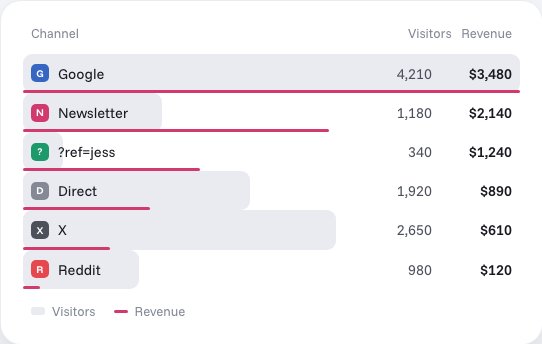
Stickybeak is live analytics for every site you own, and it's in early access. It shows bounce rate and session time, and you can do the splitting in the steps above by clicking to filter by referrer, page, country or device.
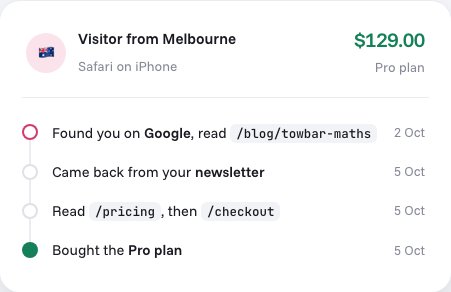
For sites that sell something, each order keeps its trail: the entry page, the referrer, every UTM tag and the pages read before buying. So instead of asking whether a page has a high bounce rate, you can ask which entry pages and sources led to a sale. That is often the question you wanted answered.
Stickybeak doesn't have a public price yet. If you'd like to try it when there's a spot, leave your email.
Questions
What is a good bounce rate?
It depends on the page. A blog post that answers one question can have a high bounce rate and still do its job. A pricing page with a high bounce rate is a problem. Checkout is different: bounce rate describes session engagement, and someone who reached checkout after another pageview already counts as engaged, so use funnel drop-off or exit measurements to see where people abandon. Compare a page with its own past numbers and with similar pages on your site before you compare it with anyone else's average.
What is bounce rate?
The share of visits that ended without the visitor doing anything your analytics tool counts as engagement. What counts as engagement differs from tool to tool.
Is a high bounce rate bad?
Not always. If the visitor found what they came for on one page, the visit worked. It is a problem when the page was meant to lead somewhere else, such as a product page, and visitors leave without going further.
Is bounce rate the same in Google Analytics 4?
No. GA4 defines bounce rate as the percentage of sessions that were not engaged, the opposite of engagement rate. A session is engaged if it lasts longer than 10 seconds by default (or your configured engagement threshold), has a key event, or has 2 or more page or screen views.
Does bounce rate affect SEO?
This guide doesn't make that claim. Bounce rate is a measurement in your own analytics. We can't show that it feeds any search ranking, so use it to find pages that aren't doing their job rather than as a score to chase.
Sources, checked 8 October 2026: Google Analytics Help, Bounce rate and engagement rate (GA4 definitions) and Google tag settings (configurable engagement threshold). Plausible Analytics documentation, Metrics definitions (bounce rate).