UTM parameters explained: what each one does and how to use them
A UTM parameter is a short tag on the end of a link that tells your analytics where a visit came from. This guide covers five common ones. Three do almost all the work, and most of the trouble comes from how people name them.
Add source, medium, campaign and campaign ID to a link and copy a clean, lowercase tagged URL.
TL;DR
- A UTM parameter is a short tag on the end of a link that tells your analytics where a visit came from.
- This guide covers five common UTM parameters, and three do almost all the work.
- Most of the trouble comes from how people name them.
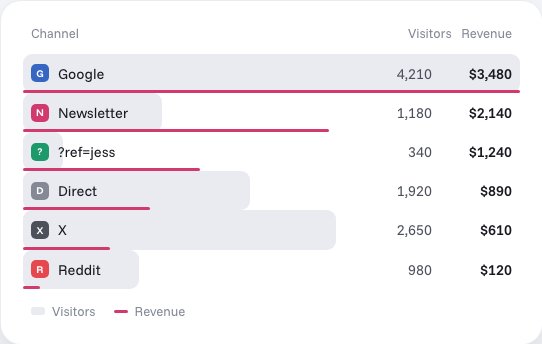
Stickybeak breaks revenue down by channel and campaign, and each order keeps its trail, every UTM tag included. It is in early access.
Get early accessWhat are UTM parameters?
UTM parameters (also called UTM codes or UTM tags) are pieces of text added to a link after a ?. They don't change the page the link opens. They only travel with the click, so your analytics can read them when the page loads.
Here is a plain link, then the same link with tags on it:
https://usestickybeak.com/
https://usestickybeak.com/?utm_source=newsletter&utm_medium=email&utm_campaign=early-access
Both open the same page. The second one tells your analytics that the visit came from a newsletter, that the channel was email, and that it was part of a campaign called early-access. Without the tags, a lot of email and app clicks arrive with no referrer at all and get filed as "direct", which tells you nothing.
usestickybeak.com/
- ChannelDirect
- SourceNot recorded
- CampaignNot recorded
usestickybeak.com/?utm_source=newsletter&utm_medium=email&utm_campaign=early-access
- ChannelEmail
- Sourcenewsletter
- Campaignearly-access
"UTM" stands for Urchin Tracking Module. Urchin was a web analytics company that Google agreed to buy in 2005, and the name stuck. The tags aren't specific to Google, though. Most analytics tools read them.
To tag a link without typing it by hand, use the free UTM builder.
The five UTM parameters
https://usestickybeak.com/?utm_source=google
- SourceWho sent this visitor?Always
- MediumWhat kind of channel was it?Always
- CampaignWhich push was it part of?Always
- TermWhich paid keyword?Paid search only
- ContentWhich link or version?When comparing two
? starts them, an & joins each one to the next, and each is a name and a value.| Parameter | Question it answers | Use it? | Example |
|---|---|---|---|
utm_source | Who sent this visitor? | Always | newsletter, reddit, google |
utm_medium | What kind of channel was it? | Always | email, social, cpc |
utm_campaign | Which push was it part of? | Always | spring-sale, launch |
utm_term | Which paid keyword? | Paid search only | running-shoes |
utm_content | Which link or version? | When you're comparing two | header-button, blue-banner |
Source is the specific place: a particular newsletter, site or platform. Medium is the type of channel, and you want only a handful of values here so reports group neatly. Campaign is the reason you sent the link, so every link in one push shares a name.
Term started life as the paid search keyword. It's blank on almost everything else, and that's fine. Content is for telling two links in the same place apart, such as a button and a text link in one email, or two versions of an ad.
UTM codes: naming them so your reports stay readable
A UTM code is only as good as its spelling. Analytics tools match values exactly, so Email, email and e-mail become three rows. A few rules prevent most of that:
- Lowercase everything. No exceptions, and no capitals for readability.
- Use hyphens, not spaces.
spring-sale, notSpring Sale. Spaces turn into%20in the link and look like a mess in reports. - Keep a short list of mediums and reuse it. Three to six is plenty. The table below is a sensible start.
- Name the campaign after the push, not the month.
spring-salecompares well year on year.spring-sale-final-v3-octdoesn't. - Write the list down somewhere your whole team can see it, even if the team is you in six months.
Email112email41e-mail9
email162
Whatever your analytics tool does with the medium, it's worth checking its documentation. Many tools sort traffic into channels partly by looking at the medium, so an invented medium may land in a catch-all channel.
| Where the link goes | utm_medium | utm_source |
|---|---|---|
| Email newsletters and campaigns | email | The list or sender, e.g. newsletter |
| Your own posts on social platforms | social | The platform, e.g. reddit, x, linkedin |
| Paid ads (search or social) | cpc | The ad platform, e.g. google, meta |
| Partners and affiliates | affiliate | The partner, e.g. jess |
| A link in a QR code or print piece | qr or print | Where it's printed, e.g. flyer |
Examples for email, social and paid
The links below point at Stickybeak's own home page, as a worked example. The tags are what matter.
https://usestickybeak.com/?utm_source=newsletter&utm_medium=email&utm_campaign=early-access&utm_content=header-button
If the same email also has a link in the body text, tag that one utm_content=body-link. After a send you can see which of the two people clicked.
Social
https://usestickybeak.com/?utm_source=reddit&utm_medium=social&utm_campaign=early-access
Platforms often add their own redirect and strip the referrer, so a tagged link is the only reliable way to tell a post from a bare "direct" visit. Use a different utm_source for each platform so you can see which one is worth the time.
Paid
https://usestickybeak.com/?utm_source=google&utm_medium=cpc&utm_campaign=early-access&utm_term=live-analytics
Here utm_term carries the keyword you bid on. Many ad platforms can fill the term in for you with a placeholder in the tracking template, which saves typing it per ad. Once paid links are tagged, you can set what a campaign brought in against what it cost; if the platform quotes a price per thousand impressions, the CPM calculator turns that into a budget or a cost per click, and the ROAS calculator sets the revenue a campaign brought against its spend and finds the break-even ROAS for your margin.
UTM tracking: how it works
- Someone clicks a tagged link.
- The page loads with the tags in its address.
- Your analytics script reads the address, finds the
utm_values, and stores them with that visit. - Everything the visitor does in that session, such as pages read or a goal reached, is reported under that source, medium and campaign.
That's all UTM tracking is. Nothing is installed on the link, and the tags don't make the page slower. A few things can break the chain:
- A redirect that drops the query string. If the tagged link bounces through a redirect and the tags don't survive, the page loads untagged. Click your own link and check the address bar on the final page.
- No analytics on the landing page. The script has to be on the page the link opens.
- The tags get cut off in a message. Some apps shorten or rewrite links. Test in the place you'll post it.
- An ad blocker. If the visitor's blocker stops your analytics from loading, nothing is recorded, tagged or not. That's a separate problem from the tags themselves.
Common UTM mistakes
- Mixed case.
Facebook,facebookandFBbecome three sources. Pick one spelling. - Tagging internal links. A tagged link from one of your own pages to another can start a new session or replace the source the visitor arrived with, so the original channel is lost. Tag links that bring people in, never links between your own pages.
- Missing medium. A link with a source but no medium leaves the report with a gap, and tools tend to file it under a catch-all such as "unassigned" or "(not set)". Always set source, medium and campaign together.
- Putting the campaign in the source. Source is who sent the visitor. Campaign is the push. Mix them and a report can't be sliced either way.
- Different names for the same thing.
emailin one campaign andnewsletteras the medium in the next. - Untested links. Click it. Check it lands on the right page, and check the visit appears under the source you expect.
Reading the results
In any analytics tool the job is the same: find the report that groups visits by where they came from, then split it by source, medium or campaign. Most tools let you switch that report between source, medium and campaign.
Three questions are worth asking of every campaign:
- Did anyone arrive? If a campaign has no visits, check the link before you blame the audience.
- Did they do anything? Visits are the start. Look at a goal or a sale next to them.
- Which version won? This is what
utm_contentis for.
Clicks on their own can mislead. A post with 400 visits and no sales isn't a better result than one with 40 visits and three, which is why it helps to read tags against revenue. If a source sends plenty of visits that leave straight away, see bounce rate: what it means and what's good. For visits that arrive without a tag, see referral traffic, including visits from AI tools.
Worked example: tags in Stickybeak
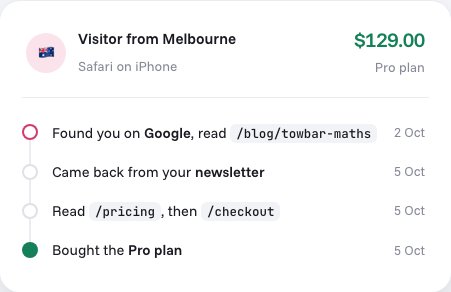
Stickybeak is live analytics for every site you own, and it's in early access. It breaks revenue down by channel, campaign and ?ref= code, and each order keeps its trail: the entry page, the referrer, every UTM tag, and the pages read before buying. That means a tagged link can show up as a line in the trail behind a sale, so you can judge a campaign by what it earned as well as by clicks. Watching a send land in a real-time view is also the quickest way to see that your tags are being read.
Stickybeak doesn't have a public price yet. If you'd like to try it when there's a spot, leave your email.
Questions
What are UTM parameters?
Short tags added to the end of a link, such as ?utm_source=newsletter&utm_medium=email&utm_campaign=spring-sale. When someone clicks, your analytics reads the tags and records which source, medium and campaign sent the visit.
Which UTM parameters are required?
In practice, utm_source, utm_medium and utm_campaign. utm_term and utm_content are optional.
Are UTM parameters case sensitive?
In most analytics tools, yes. Email and email show up as two different mediums. Keep every value lowercase.
Should I use UTM parameters on internal links?
No. Use them on links that bring people to your site from somewhere else. On a link between your own pages, a UTM tag can start a new session or replace the source the visitor arrived with, so the original channel is lost.
Do UTM parameters affect SEO?
They create extra addresses for the same page, so give the page a canonical tag pointing at the clean URL. Use UTM links for campaigns you control, such as email, ads and your own social posts.
Do UTM links work without Google Analytics?
Yes. UTM tags are just text in the link. Most analytics tools read them, not only Google Analytics.
Sources, checked 8 October 2026: Google Analytics Help, URL builders: collect campaign data with custom URLs (Google Analytics reads the UTM parameters in a clicked link). Google press release, Google agrees to acquire Urchin, 28 March 2005.