What is direct traffic? Meaning, causes and how to fix it
Direct traffic is the visits your analytics tool can't trace to a source. It is not the same as people typing your address: it is a catch-all, and on most sites a good part of it is traffic from somewhere else that lost its label on the way.
Tag the links you control with source, medium and campaign so their visits arrive with a label.
TL;DR
- Direct traffic is the visits your analytics tool can't trace to a source.
- It is not the same as people typing your address: it is a catch-all.
- On most sites a good part of it is traffic from somewhere else that lost its label on the way.
Stickybeak lets you click to filter by referrer, page, country or device, so you can look inside visits a tool lumps together. It is in early access.
Get early accessDirect traffic meaning, in Google Analytics and GA4
When someone arrives, your analytics tool looks for two clues: the referrer (the page they clicked from) and campaign tags in the link, such as UTM parameters. If it finds neither, or none it recognises, the visit has no source. Most tools file it as direct. Bots send no referrer either, so a jump in direct visits can be bot traffic, not people.
Google Analytics 4 is specific about it. In the default channel group, Direct is traffic where the source exactly matches (direct) and the medium is (not set) or (none). Google's help page describes it as users arriving via a saved link or by entering your URL. That is the tidy version. The rule itself only says "nothing to attribute", so many visits that arrive without a clue land there too. Which source a visit gets also depends on the report and its attribution rules: GA4 can credit a returning visitor's bookmark visit to the source of an earlier visit, so a bookmark isn't always counted as direct.
Direct is one of several channels. The usual split looks like this:
| What arrived with the visit | Usually filed as | Example |
|---|---|---|
| A UTM tag | Whatever the tag says | utm_medium=email is email |
| A referrer from a search engine | Organic search | A click from a Google results page |
| A referrer from a social platform | Social | A click from a Reddit post |
| A referrer from any other site | Referral | A click from a blog that links to you |
| Nothing | Direct | A typed address, or a link that sent no referrer |
Where direct traffic comes from
Some direct visits are what the name says: someone typed your address, used a bookmark or picked you from their browser's suggestions. Those are people who already know you. The rest are visits whose source went missing. The usual causes:
| Where the visit really came from | Why it shows as direct |
|---|---|
| A typed address or a bookmark | Nothing was clicked, so there is no referrer. This is true direct traffic. |
| A link in a messaging app or a private chat | Many such apps send no referrer. People call this dark social: shared where no tool can see it. |
| A link in an email app, a PDF or a document | Desktop and native apps often send no referrer, and an untagged link has nothing else to go on. |
| A click from an HTTPS page to an HTTP page | Under the default referrer policy browsers send nothing when a visit moves from HTTPS to HTTP. |
A link marked rel="noreferrer" | The link asks the browser to leave the referrer out. |
| A tagged link that lost its tag | A redirect, a link shortener or an app dropped the UTM parameters, and no referrer survived either. |
| Your own team, and some bots | They type the address and have no referrer. Exclude them so they don't pad the number. |
MDN explains the browser side: the default referrer policy is strict-origin-when-cross-origin, a site can ask browsers to send no referrer at all, and nothing is sent when a visit moves from HTTPS to HTTP. So a direct visit is evidence that no source arrived, not evidence that none existed. The referral traffic guide covers how referrers are detected and when they go missing, so we won't repeat it here.
Direct traffic vs organic traffic
Organic traffic is visits from a search engine's results, and it arrives with a search engine as the referrer. Direct has no source at all. The two blur in practice: someone who reads about you in a chat, then searches your name, is organic, and the chat that started it leaves no trace. Someone who clicks your link in that chat arrives as direct.
| Direct | Organic search | |
|---|---|---|
| What the visit carries | No referrer and no campaign tag | A search engine as the referrer |
| What it tells you | Little, other than the landing page | Which engine; search terms only in Search Console |
| Can you act on it | Only by tagging links and tidying the setup | Yes, through your pages and search listings |
Our SEO and Google Analytics guide covers which tool answers which search question.
How to reduce direct traffic
You can't recover the source of a visit that arrived without one. You can stop creating new ones from links you control, and you can read what's left more sensibly.
- Tag the links you place on other channels. Newsletters, social bios, QR codes, PDFs, email signatures and partner links all get UTM parameters. Don't tag links between your own pages: that can replace the visit's real source. A tagged visit keeps its campaign even when no referrer arrives. Our UTM parameters guide explains the tags, and the UTM builder makes the links.
- Give each person or partner their own tagged link. A UTM-tagged link handed to one person or partner turns an invisible share into a named source.
- Keep your own site on HTTPS and link out with care, so you don't strip referrers from your own traffic between sites.
- Check redirects. A redirect or link shortener that drops query strings drops your tags with them. Click a tagged link yourself and look at the address you land on.
- Exclude your own visits and bots so the number reflects customers.
- Read direct by landing page. Direct visits to your homepage are plausibly people who know you. Direct visits to a deep article are rarely typed addresses: they may be shared links or bookmarks.
Even then, some direct traffic is permanent. Treat it as the part of your audience you can't see, not as a number to drive to zero.
Is direct traffic good or bad?
Neither, on its own. A rising direct line can mean more people know your name. It can equally mean more of your referrals are losing their source. The number alone can't say which, so judge it against other signals: whether branded searches are rising in Search Console, which landing pages the direct visits hit, and whether direct visits buy. If direct traffic suddenly falls, or any channel does, work through the website traffic drop checklist before assuming people left.
AI tools add a wrinkle. A link in an AI answer usually carries a referrer, but a person who reads an answer and then types your name into a browser or searches for you leaves no trace of it. The referral traffic guide covers which AI visits you can see. Someone who searches for you afterwards can appear under organic search. Someone who enters your URL may appear under Direct. Neither identifies the earlier AI answer.
How to see what is inside your direct traffic
- Open the landing pages report for the last 30 days and filter to direct.
- Sort by page. Deep articles and product pages with direct visits may come from shared links or bookmarks. The homepage points to people who know you.
- Check the time of day and the days. A spike right after you sent a newsletter or posted in a group may be an untagged send. Send a tagged link next time and compare before you credit it.
- Compare against sales or goals. Direct visits that buy are real customers whose route you can't see.
In Stickybeak
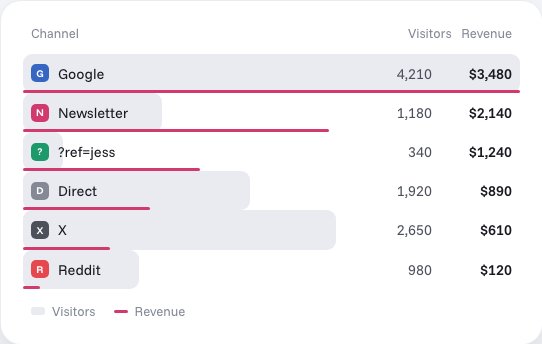
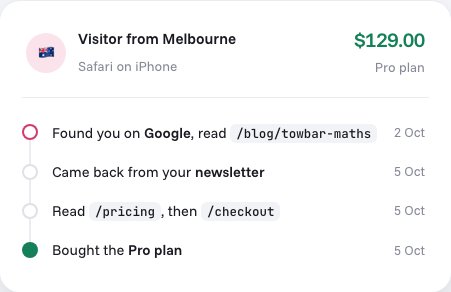
Stickybeak is live analytics for every site you own, and it's in early access. Visits with no tag and no referrer are labelled Direct, and you can click any referrer, page, country or device to filter the wall by it, so you can see what direct visitors read. Revenue is broken down by channel, campaign and ?ref= affiliate code, so a partner's ?ref= link shows what it earns. Each order keeps its trail: the entry page, the referrer, every UTM tag and the pages read before buying, so a direct order shows exactly that: no referrer, no tag, and the pages the visitor read.
Our own numbers
Stickybeak has only been tracking usestickybeak.com since 6 October 2026, so we have no share of direct visits to publish yet. When reporting a direct-traffic percentage, include the number of direct visits, the total visit count and the date range.
Questions
What is direct traffic?
Direct traffic is visits your analytics tool can't trace to a source. In Google Analytics 4 the Direct channel is traffic whose source is (direct) and whose medium is (not set) or (none). Google describes it as users arriving via a saved link or by entering your URL, but in practice it also holds many visits that arrived with no referrer and no campaign tag. Which source a visit is recorded under also depends on the report and its attribution rules: Google's own example attributes a bookmark return to the earlier referral.
What is direct traffic in Google Analytics and GA4?
It is the default channel group's Direct channel: source exactly (direct), medium (not set) or (none). It is a catch-all for visits with nothing to attribute, not a count of people who typed your address.
Where does direct traffic come from?
Typed addresses and bookmarks, links shared in messaging and email apps, links in documents and some native apps, clicks that leave an HTTPS page for an HTTP one, links marked noreferrer, and visits whose tags were stripped. Some of it is real brand awareness. A lot is referral traffic with its source lost.
What is the difference between direct and organic traffic?
Organic traffic arrives from a search engine results page and carries a search engine referrer. Direct traffic arrives with no recorded source. A person who reads about you, then searches your name, is organic. A person who types your address is direct.
Is high direct traffic bad?
Not by itself. A high share usually means the report can't see where visits came from, which makes your marketing harder to judge. Tag the links you place elsewhere and look at which landing pages receive the direct visits.
How do I reduce direct traffic?
Add UTM tags to the links you place outside your site that bring visitors in: newsletters, social bios, QR codes, PDFs and campaign links. Leave links between your own pages untagged. Keep your own site on HTTPS, and exclude your own visits and bots from reports.
Sources, checked 16 October 2026: Google Analytics Help, Default channel group (the Direct definition). MDN Web Docs, Referer header (when the header is omitted or trimmed).