Wix analytics: what the built-in reports show, and what to add
Wix analytics lives in your site's dashboard under Analytics, with reports for traffic, sales, behavior and more. It's a fair start. It also has gaps, and you can fill them by adding Google Analytics or Stickybeak to the same site.
TL;DR
- Wix analytics lives in your site's dashboard under Analytics, with reports for traffic, sales, behavior and more.
- You can add Google Analytics or Stickybeak to the same site.
Stickybeak is live analytics for every site you own, and a Wix site joins a wall that shows every site at once. It is in early access.
Get early accessWhere to find analytics on Wix
Open your site's dashboard and choose Analytics. Wix's All Reports page lists the report categories, which Wix's help center names as including Sales, Bookings, Traffic, Behavior, People, Blog, Stores, Events, Marketing and SEO. Reports can be tables, bar and line charts, heat maps, funnels, maps or pie charts, and you can open and customise most of them in the Wix app or the Wix Studio app.
If you came here for the question "can I see who visits my Wix site", the short answer is yes: the Traffic reports are where to start.
What Wix Analytics shows about your traffic
Wix's Traffic overview is the page most owners want. By Wix's description it covers:
- Site sessions and unique visitors, and sessions over time.
- Traffic sources and categories, so you can see where visitors came from.
- New versus returning visitors.
- Sessions by device (desktop, mobile, tablet) and by country.
- Average sessions by day and hour.
- Traffic insights from the last 30 days.
Wix tells you how it works out sources. It reads the referring website, links opened inside social apps, ad identifiers such as Google Click ID and Microsoft Click ID, and UTM tags. Wix adds the UTM tag for you when you use Wix Email Marketing or Facebook Ads by Wix, and you can add tags by hand to other campaign links. Our UTM parameters guide explains the three parts Wix reads (source, medium and campaign name) and the two more that make the report richer.
Other reports are specific to what you run on Wix, such as blog analytics for post views and search performance, and store and bookings reports. The names and layouts change as Wix updates its dashboard, so use Wix's About Wix Analytics reports page for the current list.
What Wix Analytics doesn't show
Wix is upfront about one limit: traffic from visitors who haven't accepted the site's cookies, or who use certain types of ad blockers, won't appear in its reports. So the Wix number is a floor, not a head count. That's true of most analytics tools that rely on cookies and a script a blocker can recognise, and it's why two tools on one site rarely agree.
Other gaps depend on what you need to know:
- It sits in one dashboard per site. Each site's reports live in that site's dashboard. Wix Studio for enterprise also has an overview across all of an account's sites, but a Wix site next to a shop or blog elsewhere still means more than one place to look.
- It's Wix's view of Wix. If you'd like the same reports for a site that isn't on Wix, you need a tool that isn't tied to Wix.
- Plan limits apply to some features. The Wix help pages we checked don't state a plan requirement for the standard reports, but Wix says its Analytics Pro AI assistant needs an upgraded site. Check your own dashboard to see what your plan includes.
How to add Google Analytics to Wix
Google Analytics for Wix means connecting a Google Analytics 4 property to your site. Wix says you must have a Premium site and a connected domain. The steps, from Wix's help center:
- Create a GA4 property. In Google Analytics, create a property, set up a web data stream with your website's address. In the stream's advanced settings, deselect Page changes based on browser history events and turn off Site search, as Wix instructs. Then copy its Measurement ID.
- Open Marketing Integrations in your Wix dashboard.
- Click Connect under Google Tag, then choose Add Google Tag ID.
- Paste the Measurement ID with no extra spaces. You can also tick the IP anonymization option. Then click Save.
Wix notes that it may take some time before statistics show in your Google Analytics account. If you run a cookie banner, Google Analytics only gathers data after a visitor consents, and Wix says visitors from regions covered by the GDPR who haven't consented won't send data. That's a common reason Wix and Google Analytics show different numbers. For choosing between Google's own tools, our Google Tag Manager vs Google Analytics guide explains which does what. And if you later want it gone, how to remove Google Analytics covers the Wix field too.
Wix Analytics, Google Analytics and Stickybeak side by side
These do different jobs, and plenty of Wix owners use more than one. Facts below are from Wix's help center (checked 16 October 2026) and from Stickybeak's own docs.
| What to compare | Wix Analytics | Google Analytics 4 | Stickybeak |
|---|---|---|---|
| How you get it | Built into the Wix dashboard | Paste a Measurement ID under Marketing Integrations | Paste one script tag into site-wide Custom Code |
| What your Wix site needs | Check report availability in your dashboard | A Premium site and a connected domain | A published connected domain and a Premium plan, or a Studio plan in Wix Studio |
| Where you read it | That one site's dashboard, and the Wix apps | Your Google Analytics account | One live screen for every site you add |
| Visitors it can miss | Those who haven't accepted cookies, or use certain ad blockers | With a cookie banner, those who haven't consented | On a Wix site the script loads from Stickybeak, which blockers find easier to spot than a script on your own domain |
Your plan and your jobs decide the mix. If you only want a quick look at visits, Wix's reports may be enough. On a store instead? Our Shopify analytics guide covers the same ground for Shopify. If you want to compare Google's tool with lighter options, see our Google Analytics alternatives guide.
Add Stickybeak to a Wix site
Stickybeak is live analytics for every site you own, and it's in early access. On Wix it goes in as site-wide Custom Code, the same way as other tags, in Wix or Wix Studio. The short version:
- In your dashboard, open Settings, then Development & integrations, choose Custom Code, then click + Add Custom Code.
- Paste the Stickybeak script, name it Stickybeak.
- Choose All pages, Load code only once per visit and Head, then click Apply.
Custom code doesn't run in the editor or preview, so check it on the published connected domain. The full steps, with the script, are in the Wix install guide. Wix pages change routes without a full reload, and Stickybeak records those changes, which is why the code should load once per visit.
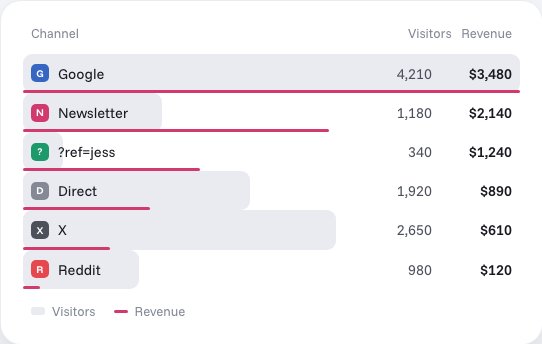
What you get is a live view of who is on, where they came from and what they did. Revenue is broken down by channel, campaign and ?ref= code where revenue is sent. On Wix, buttons can't take custom attributes, so goals work by sending forms and bookings to a thank-you page and setting a page-visit goal; email, phone and external links are recorded on their own (custom goals). A page-visit goal has no amount, so sending revenue needs a checkout integration that provides the order value, currency and ID. For why a live view matters, see real-time website analytics.
If your numbers look wrong
- Look at the published site, not the preview. Stickybeak's custom code doesn't run in the editor or preview, so test on the live connected domain.
- Compare like with like. Wix counts sessions and unique visitors under its own rules; Google Analytics 4 uses different definitions. Pick the same dates and the same measure before you compare.
- Allow for consent and blockers. Both Wix and Google Analytics leave out visitors who haven't consented, and Wix leaves out some who use ad blockers.
- Check your traffic sources. A big Direct share often means untagged links. See what direct traffic is.
Questions
Where do I find analytics on Wix?
In your site's dashboard, under Analytics. Wix's All Reports page there lists the report categories, including Traffic, Sales, Behavior, Marketing and SEO. You can also open most reports in the Wix app or the Wix Studio app.
What does Wix Analytics show?
The Traffic overview covers sessions and unique visitors, traffic sources, new and returning visitors, sessions by device and country, and busy times of day. Other report categories cover sales, bookings, behavior, blog, stores and more.
Can I use Google Analytics with Wix?
Yes. Wix says you need a Premium site and a connected domain. Create a Google Analytics 4 property, copy its Measurement ID, then open Marketing Integrations in your Wix dashboard, connect Google Tag and add the ID.
How do I add Google Analytics to Wix?
Set up a Google Analytics 4 web data stream, deselect 'Page changes based on browser history events' and turn off 'Site search' in its advanced settings, then copy the Measurement ID. In Wix, open Marketing Integrations, click Connect under Google Tag, choose Add Google Tag ID, paste the ID and save. Wix notes it can take some time before statistics appear in Google Analytics.
Why don't my Wix and Google Analytics numbers match?
Each tool has its own counting rules and its own blind spots. Wix says visitors who haven't accepted the site's cookies, or who use certain ad blockers, don't appear in its reports. With a cookie banner, Google Analytics only gathers data after a visitor gives consent. Small differences are normal.
Do I need a paid Wix plan for analytics?
For Google Analytics, Wix says you need a Premium site and a connected domain. The Wix help pages we checked don't state a plan requirement for the built-in reports, though Wix says its Analytics Pro assistant needs an upgraded site. Check your own dashboard for what your plan includes.
Can I add Stickybeak to a Wix site?
Yes, with site-wide Custom Code in Wix or Wix Studio. It needs a published connected domain and a Premium plan, or a Studio plan in Wix Studio. Custom code doesn't run in the editor or preview, so check the published site. Stickybeak is in early access.
Sources, checked 16 October 2026: Wix Help Center, About Wix Analytics reports, Wix Analytics overviews, Tracking campaigns and traffic sources in Wix Analytics, Wix Studio enterprise analytics and connecting Google Analytics to your Wix site. Stickybeak facts: our Wix install guide.