CTR calculator
This free CTR calculator (also called a click rate calculator) turns your clicks and impressions into a click-through rate. Add a target to see how many more clicks it would take to reach it.
Your click-through rate
How the calculator works
Click-through rate (CTR) is the share of impressions that turned into a click:
CTR = clicks ÷ impressions × 100
The example button uses 12,000 impressions, 240 clicks and a target of 3%. Worked by hand:
- CTR: 240 ÷ 12,000 × 100 = 2.00%, or 1 click for every 50 impressions, which is 20 clicks per 1,000.
- Clicks at the target: 12,000 × 3% = 360.
- Extra clicks: 360 − 240 = 120 more, on the same 12,000 impressions.
- Rounding: clicks come in whole numbers, so a fractional answer is rounded up. At a 2.5% target on 100 impressions the exact figure is 2.5 clicks, so you need 3.
The calculator also shows a likely range (95%, using the Wilson score interval). Your clicks are one sample of how people respond, not a fixed fact about the link. With 240 clicks from 12,000 impressions the range is about 1.76% to 2.27%. With 12 clicks from 600 impressions the rate is still 2.00%, but the range widens to roughly 1.15% to 3.46%. The fewer impressions you have, the less one number tells you.
The range needs one clicked-or-not outcome per impression, which is why email should use unique recipients who clicked against delivered messages: repeat clicks from one person would inflate the rate and break the range. It treats each impression as an independent chance to click. If the same people see your link many times, or the platform rounds or samples its numbers, treat the range as a rough guide.
The CTR formula for ads, email and search
The formula is the same everywhere. Only what you count as a click and an impression changes. Google Ads Help defines it as clicks divided by the number of times your ad is shown, and gives 5 clicks on 100 impressions as 5%. Search Console defines click-through rate as clicks ÷ impressions, where an impression is how often someone saw a link to your site on Google (Google Ads Help, Search Console Help, read 17 October 2026).
| Where | Impressions | Clicks | Example |
|---|---|---|---|
| Google Ads CTR | Times the ad was shown | Clicks on the ad | 50 ÷ 4,000 × 100 = 1.25% |
| Search (Search Console) | Times your page appeared in results | Clicks through to your site | 90 ÷ 3,000 × 100 = 3.00% |
| Email CTR | Delivered messages | Recipients who clicked | 150 ÷ 5,000 × 100 = 3.00% |
| Social post | Times the post was shown | Link clicks | 36 ÷ 1,800 × 100 = 2.00% |
The examples are made-up numbers to show the arithmetic, not typical rates.
To go the other way, clicks = impressions × CTR ÷ 100, and impressions = clicks ÷ CTR × 100. CTR is a different number from CPM (cost per thousand impressions), which is about price and has its own CPM calculator, and from conversion rate, which counts what happens after the click. The conversion rate calculator does that step.
The extra clicks figure
It is impressions × target, rounded up to a whole click, minus your clicks: how many more clicks you would get if the same number of impressions performed at the target. It doesn't assume you will get more impressions, and it can't say whether a change will really lift your CTR. It shows what the target is worth if you reach it.
What counts as a good CTR
There isn't one number. A good CTR depends on the channel, because each channel counts impressions and clicks differently and shows your link to people in a different frame of mind. This page doesn't list benchmark percentages, because a figure from someone else's sample would say little about yours.
| Channel | An impression is | A click is | Watch out for |
|---|---|---|---|
| Search results | Your page appearing on a results page | Someone clicking through to it | Position matters a lot. A page ranked higher is seen and clicked more. |
| Paid ads | The ad being shown | A click on the ad | Compare ads in the same placement and audience. |
| Usually a delivered message | A recipient who clicked a link inside it (unique clickers, not total clicks) | Some tools divide by opens instead, which gives a higher figure (click-to-open rate). | |
| Social posts | The post shown in a feed | A click on its link | Likes and replies aren't clicks. Count link clicks only. |
Definitions vary by platform. Check how yours counts before comparing.
So the useful comparisons are your own: the same channel last month, the same ad before and after you changed it, one page against another in the same search results. Use the range to check a difference is bigger than noise.
What to do with the number
- Use one source for both numbers. Take clicks and impressions from the same report and the same dates, or the rate will be off.
- Check the range before you celebrate. If last week was 2.0% and this week is 2.3%, but the ranges overlap, the difference may be noise.
- Change one thing at a time. A new title, a new image or a new audience each shifts CTR. Change one, then measure.
- Follow the click to the visit. A click is only the first step. Look at what people did next, using the conversion rate calculator for the step after.
Where to see real clicks and visits in Stickybeak
Impressions come from the place that showed your link, such as Search Console or an ad platform. Stickybeak doesn't see impressions. It shows the other half: who actually arrived, and from where.
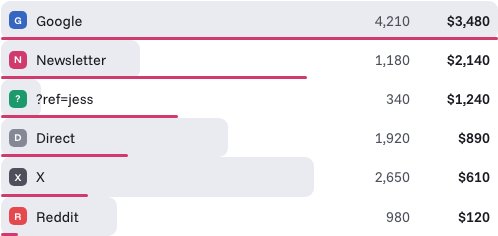
Stickybeak is live analytics for every site you own. You can filter by referrer, page, country or device, and see revenue by channel, campaign and ?ref= code. Each order keeps its trail: entry page, referrer, every UTM tag and the pages read before buying. That lets you set the visits from a channel next to the clicks the platform reported for it.
The two counts rarely match exactly. The platform counts clicks, and Stickybeak counts visits that loaded your page. On sites hosted on Cloudflare, Stickybeak runs from your own domain, which is built to count visitors that ad blockers hide. Sites hosted elsewhere can load it from Stickybeak instead, which works but is easier for blockers to spot. Stickybeak is in early access and doesn't have a public price yet.
Questions
How do you calculate CTR?
Divide clicks by impressions, then multiply by 100. If an ad was shown 12,000 times and clicked 240 times, the CTR is 240 ÷ 12,000 × 100 = 2%.
What is a good CTR?
It depends on the channel. Search results, paid ads, email and social posts all count clicks and impressions differently and attract different people, so one number from another channel is a poor yardstick. Compare your own CTR for the same channel over time, or before and after a change.
Is a click rate the same as CTR?
Usually yes. Click rate, click-through rate and CTR all mean clicks divided by impressions. In email, some tools use click rate for recipients who clicked divided by delivered messages, and click-to-open rate for clickers divided by openers, which is a higher number. Check which one your tool reports.
How do you calculate CTR for email or Google Ads?
Use the same formula. For Google Ads, divide ad clicks by the times the ad was shown. For email, divide recipients who clicked by delivered messages. Multiply by 100 for a percentage.
What is an impression?
One time your link, ad or listing was shown. In search it is a result appearing on a results page. In email it is usually a delivered message. The platform you use sets the exact definition, so use its numbers for both clicks and impressions. For email, enter the recipients who clicked (not total clicks) against successful deliveries.
Why do my clicks not match the visits on my site?
A click is counted by the platform that showed the link. A visit is counted by your own analytics. People can click and leave before the page loads, and blockers can hide visits from some analytics tools, so the two numbers rarely match exactly.
Can CTR be more than 100%?
Normally not, because a click needs an impression first. If you see more than 100%, the two numbers are probably counted differently, for example clicks per person against impressions per day.
Does this calculator save what I enter?
No. Everything is calculated in your browser. Nothing you type is sent anywhere or stored.