SEO and Google Analytics: what analytics can and can't tell you
Google Analytics tells you what visitors do after they arrive from search. It does not collect what they searched for, how often you appeared, or where you ranked. That data comes from Search Console, and GA4 can show it only after you link the two. Use both, for different questions.
Turn the clicks and impressions from Search Console into a click-through rate and see its likely range.
TL;DR
- Google Analytics tells you what visitors do after they arrive from search.
- It does not collect what they searched for, how often you appeared or where you ranked.
- That data comes from Search Console, and GA4 can show it only after you link the two.
- Use both, for different questions.
Stickybeak shows where visits came from and, for sites that sell, the entry page and referrer behind each order. It is in early access.
Get early accessWhich tool answers which SEO question
Most confusion about SEO and analytics comes from asking one tool a question the other one owns. This is the split:
| The question | Where the answer is |
|---|---|
| What did people search for before they saw me? | Search Console, Performance report, Queries. Also shown in GA4 once the two are linked |
| How often did I appear in results? | Search Console, impressions |
| Where did I rank? | Search Console, average position |
| Do people click my result? | Search Console, click-through rate. The CTR calculator works it out from clicks and impressions |
| How many visits came from organic search? | Your analytics, by channel |
| Which pages do search visitors land on? | Your analytics, landing pages. Search Console also has a Pages view of clicks and impressions |
| Do search visitors stay, click on or buy? | Your analytics, goals and revenue |
| Which channel earns the most? | Your analytics, revenue by channel |
In short: Search Console is what happened before the click, and analytics is what happened after it. Each tool collects only its own half. Linking them in GA4 lets Analytics display Search Console's half next to its own, but the data still comes from Search Console.
What Search Console measures
Search Console reports on your presence in Google Search, using Google's own data. Its definitions matter, because they are not the same as an analytics tool's:
- Impressions: Google counts one when a user has seen, or potentially seen, a link to your site in Search, Discover or News.
- Clicks: any click that sends the user to a page outside of Google Search, Discover or News.
- Position: approximately where on the page your link was seen, relative to other results. The figure is an average across all impressions, so a single search can look different.
- Click-through rate: clicks divided by impressions.
You can break the Performance report down by query, page, country, device and date. Google keeps 16 months of it. Some query data may not appear in your report even though it appears in search, so treat the query list as a strong sample and not a full census.
AI features are in there too. Google says sites appearing in AI Overviews and AI Mode are included in overall search traffic in Search Console and reported in the Performance report under the Web search type. It does not give them a separate line.
What analytics measures
An analytics tool runs a script on your pages, so it only knows about visitors who actually loaded one. It sorts those visits into channels using the referrer and any UTM tags, which is covered in the referral traffic guide. Search visits arrive with a search engine as the referrer and land in an organic search channel; the organic traffic guide explains what that channel includes and why it's undercounted.
What the tool can add is everything after the click:
- Which landing page the search visitor arrived on, and which pages they read next.
- Whether they came back, and by which channel.
- Whether they completed a goal or bought something, and how much it was worth.
That last part is the one Search Console cannot do at all. A page can have thousands of impressions and plenty of clicks and still earn nothing. Only analytics shows that.
One thing analytics does not record by itself is the search. The visit tells you the search engine, not the words typed into it. For the words, use Search Console, or link it to GA4 to see them there.
How to link Search Console to Google Analytics 4
If you use GA4, you can bring the two together. Google's help page for the link says you need the Editor role on the Analytics property and to be a verified owner of the Search Console property.
- Verify your site in Search Console if you haven't. You need verified owner access.
- Link the property from the Analytics admin settings, in the product links section, and choose the Search Console property and the web data stream.
- Publish the Search Console collection. It is unpublished by default. Find it under Library in the left navigation and publish it.
- Open the two reports. Google Organic Search Queries shows search queries with Search Console metrics. Google Organic Search Traffic shows landing pages with both Search Console and Analytics metrics.
Two limits to know. A web data stream links to only one Search Console property, and the data appears in Analytics about 48 hours after Search Console collects it, with a maximum of 16 months.
Why the numbers never match
Search Console clicks and analytics organic visits will differ. That is normal, and it is not a sign something is broken. A few reasons:
- Different things are counted. A click is a click on a result. A visit needs a script to load and report the page view.
- Scripts get blocked. Ad blockers and privacy tools stop many analytics scripts, so some real visits never reach your reports. Search Console is not affected, because Google counts the click on its own side.
- Consent choices. If your analytics only runs after a visitor agrees, declined visits are missing.
- Bots. Tools differ in how well they keep bots out of visitor counts. See the AI crawlers guide.
- Definitions of a session and a landing page vary by tool, and the dates are cut in different time zones. Tools also measure time per session differently; see average session duration.
Pick one tool per question and watch its trend over weeks. A rising line in each, moving the same way, is a better sign than two equal numbers.
A routine that uses both
- Search Console, Queries, last 28 days. Note the searches with many impressions and a low click-through rate. Those are title and description jobs. To check a rate by hand, the CTR calculator gives it with a likely range.
- Search Console, Pages. Note pages sitting between positions 8 and 20. A small push can move them onto the first page.
- Analytics, organic search channel. Check the landing pages for those same pages. Do the visitors read on, join a list or buy?
- Fix the page that gets visits and earns nothing before you chase more visits to it.
- Mark the change with a date and check both tools again in four weeks. Search results move slowly.
In Stickybeak
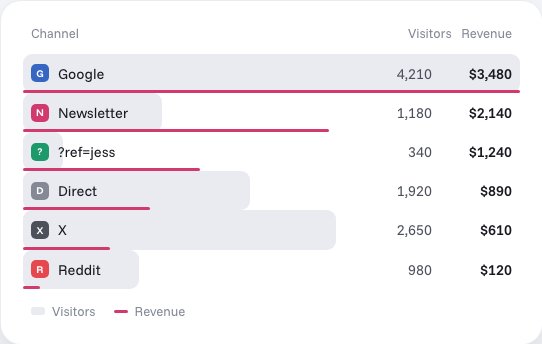
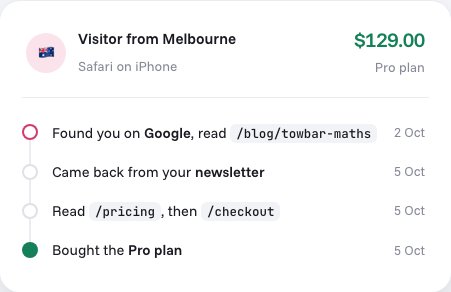
Stickybeak is live analytics for every site you own, and it is in early access. Its channels view files search visits under the search engine, and AI assistants such as ChatGPT, Perplexity, Claude, Gemini and Copilot are their own channels. Revenue is broken down by channel, campaign and ?ref= code, and each order keeps its trail: the entry page, the referrer and the pages read before buying. So for each landing page you can see what search visitors went on to do. For the queries and impressions, you still use Search Console. Stickybeak does not replace it.
Our own numbers
We would like to show real Search Console questions here. We can't yet. usestickybeak.com is days old, and as of 9 October 2026 Search Console shows only a couple of impressions and no clicks, which is too little to learn from. We will add real queries and what visitors did after them once there are enough, with the dates they cover.
Questions
Does Google Analytics show which keywords people searched?
Not in its standard reports. Google Analytics records that a visit came from Google organic search, but the searches themselves come from Search Console. Once you link the two in GA4, the Google Organic Search Queries report shows those queries next to Search Console metrics.
What is the difference between Search Console and Google Analytics?
Search Console reports how your site appears in Google Search: impressions, clicks, average position and the queries behind them. Analytics reports what visitors do on your site after they arrive: which pages they read, where they came from and which goals they complete.
Why don't my Search Console clicks match my analytics visits?
They count different things. A Search Console click is a click on a result in Google. An analytics visit is recorded only if your tracking script loads and counts the page view. Blocked scripts, consent choices, bots, and the way each tool defines a session all make the numbers differ, so compare trends rather than expecting an exact match.
How do I link Search Console to Google Analytics 4?
You need the Editor role on the Google Analytics property and verified owner access to the Search Console property. Link them in the Analytics admin settings, then publish the Search Console collection from Library, because it is unpublished by default. A web data stream links to only one Search Console property.
How far back does Search Console data go?
Sixteen months. Analytics reports built on the link have the same limit, and the data appears about 48 hours after Search Console collects it, so export what you want to keep.
Do AI Overviews and AI Mode show up in Search Console?
Google says sites appearing in AI features such as AI Overviews and AI Mode are included in overall search traffic in Search Console, reported in the Performance report under the Web search type. Google doesn't split them out as a separate line there.
Sources, checked 10 October 2026: Google Search Console Help, Performance report definitions and Performance report (Search results). Google Analytics Help, Connect Search Console to Google Analytics. Google Search Central, AI features and your website.