Free UTM builder for Google Analytics (GA4)
This UTM builder adds the tags Google Analytics reads (source, medium, campaign and the rest) to any link, so you can see which email, post or ad brought each visit. Fill in the boxes and the link builds as you type. It's lowercase, properly encoded and ready to copy.
Your tagged link
How the builder works
It joins your URL and your values into one link. Source, medium and campaign are always added, and campaign ID, term and content only when you fill them in. Each one becomes a utm_ tag after a ?, or after an & if the link already has a query string.
For the example button, a link to https://yoursite.com/pricing with source newsletter, medium email and campaign spring-sale comes out as:
https://yoursite.com/pricing?utm_source=newsletter&utm_medium=email&utm_campaign=spring-sale
Along the way it does the fiddly bits for you:
- Lowercase. Most analytics tools treat
Emailandemailas different values, so one campaign ends up in two rows. Lowercase is on by default. Untick it if you really do need capitals. - Spaces. A space in a link is a mess, so they become hyphens (or underscores, or
%20, your choice). - Special characters.
&,=,#and?would break the link, so they're encoded. - Existing tags. If your URL already has
utm_tags for source, medium, campaign, ID, term or content, they're replaced rather than doubled up. Other query parameters and any#sectionare kept, and the#sectionstays at the end where it belongs. - No
https://? It adds one and tells you.
The link is built in your browser. What you type isn't sent anywhere or saved.
What each UTM parameter is for
| Parameter | Question it answers | Examples |
|---|---|---|
utm_source | Who sent this visitor? | newsletter, x, reddit, google |
utm_medium | What kind of channel was it? | email, social, cpc, affiliate |
utm_campaign | Which push was it part of? | spring-sale, launch-2026 |
utm_id | Which campaign, by code? | sp26, q4-launch |
utm_term | Which paid keyword? | running-shoes |
utm_content | Which link or version? | header-button, footer-link |
Source, medium and campaign are the ones to fill in every time. Reach for term and content only when you have something to tell apart.
How Google Analytics 4 reads your UTM tags
Google's GA4 documentation documents nine parameters: utm_id, utm_source, utm_medium, utm_campaign, utm_term, utm_content, utm_source_platform, utm_creative_format and utm_marketing_tactic. It also says utm_creative_format and utm_marketing_tactic aren't currently reported in Google Analytics properties, so there is little reason to add them. This builder covers six of the nine, which is what most links need. To add utm_source_platform by hand, put it before any #fragment with &, for example https://example.com/page?utm_source=newsletter&utm_medium=email&utm_campaign=spring-sale&utm_source_platform=mailer#pricing.
- Always set
utm_source,utm_mediumandutm_campaignon each link. Google says to always use these three, and that leaving relevant parameters out is how(not set)ends up in reports. - Values are case sensitive.
utm_source=googleandutm_source=Googleare different values. That is why this builder lowercases by default. - The tags only work on the link people click. Check the tagged link in your browser, then open GA4's Realtime report to confirm the visit is collected. Realtime can't confirm campaign attribution, because its acquisition cards leave out new users who haven't been processed yet. Check session source / medium in Traffic acquisition once the data has processed.
Once the visits arrive, the Traffic acquisition report can group them by session source / medium or session campaign. Visits with no tags at all are sorted by what GA4 can see, which is why untagged links often land in direct traffic or referral traffic.
UTM naming conventions that keep reports clean
The builder cleans up spelling. It can't pick your names, so agree a short list once and reuse it. This is a convention we suggest, not a rule from Google:
| Where the link goes | utm_source | utm_medium | utm_campaign |
|---|---|---|---|
| Newsletter | newsletter | email | spring-sale |
| A post on X | x | social | spring-sale |
| A paid search ad | google | cpc | spring-sale |
| A partner's page | partner-name | referral | spring-sale |
The campaign stays the same across channels, so one push reads as one row. The source and medium change with the channel. Lowercase words joined with hyphens, no spaces, no dates unless the date is the point.
Six mistakes that make UTM data useless
- Mixed case.
Facebook,facebookandFBbecome three sources. Pick one spelling and write it down. - Tagging your own internal links. A tagged link from one of your pages to another can replace the source the visitor arrived with. Tag links that bring people in.
- Different names for the same thing.
emailin one campaign andnewsletteras a medium in the next. Keep a short list of mediums and reuse them. - Putting the campaign name in the source. Source is the sender, campaign is the push. Mixing them makes reports hard to read.
- Dates and one-offs in every name.
spring-saleis easy to compare year on year.spring-sale-final-v3-octisn't. - Forgetting to test the link. Click it, check it lands on the right page and check the visit shows up under the source you expect.
The builder lowercases for you, warns you about odd characters and reminds you about internal links. Naming and testing are still up to you.
Once the links are out, see what they bring in
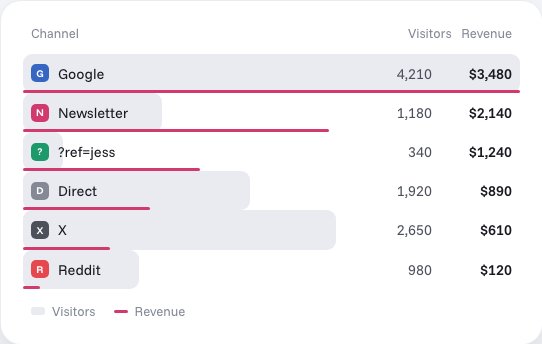
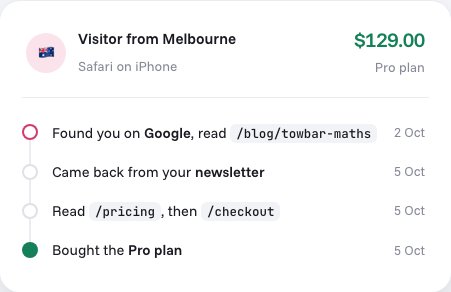
Tags only help if you read them back. Stickybeak is live analytics for every site you own, and it breaks revenue down by channel, campaign and ?ref= code. Each order also keeps its trail: the entry page, the referrer, every UTM tag, and the pages read before buying.
So a link you tag here can end up as a line in the trail behind a sale, and a campaign can be judged on what it earned as well as on clicks. Stickybeak is in early access and doesn't have a public price yet.
Questions
What is a UTM link?
It's an ordinary link with extra tags on the end, such as ?utm_source=newsletter&utm_medium=email&utm_campaign=spring-sale. When someone clicks it, your analytics reads the tags and records which source, medium and campaign sent them.
Which UTM parameters do I need?
Use utm_source, utm_medium and utm_campaign on every link. utm_term and utm_content are optional extras for paid keywords and for telling two links in the same message apart.
Are UTM values case sensitive?
Yes in Google Analytics: Google's documentation says utm_source=google is different from utm_source=Google, so Email and email become two mediums and split your numbers. Keep everything lowercase. This builder does it for you by default.
Is this the same as Google's Campaign URL Builder?
It does the same job: it adds UTM parameters to a link so Google Analytics can read them. Google's own tool is called the Campaign URL Builder. This one lowercases your values, replaces spaces, swaps out UTM tags already on the link and keeps everything you type in your browser.
Where do UTM links show up in Google Analytics 4?
After people click a tagged link, open the Traffic acquisition report and switch its dimension to session source / medium or session campaign. Standard reports aren't instant: Google's data freshness page lists processing times from a few hours to a day or more. Realtime shows that a visit was collected, but its acquisition cards leave out new users who haven't been processed yet, so it can't confirm the campaign.
Why do my UTM links show (not set) in GA4?
Google says to set all the relevant parameters, especially utm_source, utm_medium and utm_campaign, to avoid (not set) values in reports. A missing source, medium or campaign is the usual cause, so check the link you actually published.
Should I put UTM tags on links inside my own site?
No. Use them on links that bring people to your site from somewhere else. A tagged link between two of your own pages can replace the source the visitor arrived with, so the original channel gets lost.
Do UTM parameters hurt SEO?
They create extra addresses for the same page, so make sure the page has a canonical tag pointing at the clean URL. Use UTM links for campaigns you control (email, ads, social posts), not for links other sites might copy.
Does this tool store the links I build?
No. The link is built in your browser as you type. Nothing you enter is sent anywhere or saved.