Squarespace analytics: what the built-in reports show, and what to add
Squarespace analytics is the Analytics panel in your site's dashboard: visitors, traffic sources, content and, if you sell, sales. It's a fair start. You can add Google Analytics with a built-in connection, or Stickybeak through Code Injection, to cover what it leaves out.
TL;DR
- Squarespace analytics is the Analytics panel in your site's dashboard: visitors, traffic sources, content and, if you sell, sales.
- Add Google Analytics with a built-in connection, or Stickybeak through Code Injection, alongside it.
Stickybeak goes onto a Squarespace site through Code Injection, and shows every site you own on one live wall. It is in early access.
Get early accessWhere to find analytics on Squarespace
Open the Analytics panel from your site's dashboard and click any report to see its data. Squarespace also has an app for iOS and Android with a lighter set of analytics cards: pageviews, subscribers and popular content, and on some plans sales revenue, conversions and top-selling products.
What you see depends on your billing plan and on whether your site is connected to a payment processor. Where a panel isn't included, Squarespace shows a preview and an upgrade option, so a missing report usually means the plan, not a fault. Squarespace's help page has the current plan table: Squarespace Analytics.
Two things catch people out on day one. Squarespace says data can take up to three hours to refresh, so a visit from five minutes ago may not show yet. And your own visits are ignored while you're logged in to your site, because the tracking runs in the browser and skips signed-in owners. If your numbers look empty, check both before anything else.
What Squarespace Analytics shows
By Squarespace's own description, the panels cover these jobs:
| Question | What Squarespace reports |
|---|---|
| How many people visit? | Traffic analytics: visitors over time, with unique visitors, visits and pageviews. Traffic alerts compare current traffic with the previous 28 days and name the sources behind a change. |
| Where do they come from? | Traffic sources, geography, and search keywords (site search and external). |
| What do they read? | Site content reports for page performance and engagement, and form and button conversions. |
| Are they buying? | Sales overview and product sales, the purchase funnel, and abandoned carts and recovery. |
| Who follows a blog or podcast? | RSS subscriber estimates. |
The names and layouts change as Squarespace updates its dashboard, so treat the help page as the current list. Squarespace says most cards go back to your site's creation, or to when it released that panel, whichever is later.
Unique visitors, visits and pageviews on Squarespace
These three numbers get mixed up, and Squarespace defines them like this:
- Unique visitors estimates people rather than sessions. The same person counts again after clearing cookies or switching browsers.
- Visits are browsing sessions. The tracking cookie expires after 30 minutes, and Squarespace ends every session at midnight, so a late-night visit that crosses midnight becomes two.
- Pageviews counts page requests, so it's always the highest of the three. Full page loads count; image requests and scripts don't.
On short date ranges, unique visitors can come out higher than visits, because only the first pageview of a session counts toward a visit. Visitors with Do Not Track switched on register as a new visitor on every page they view, which pushes visitors and visits up while pageviews stay accurate. Our guide to who visits your website explains what any of these tools can and can't tell you about the people behind the counts.
How to add Google Analytics to Squarespace
Google Analytics for Squarespace means connecting a Google Analytics 4 property. Squarespace has a built-in field for it, so you don't need code. The steps, from Squarespace's help center:
- Create a Google Analytics 4 property at analytics.google.com if you don't have one, and copy its Measurement ID. Measurement IDs start with
G-. - In Squarespace, open Settings, then Developer Tools, then External API Keys.
- Paste the Measurement ID into the Google Analytics field and click Save.
Squarespace says statistics can take up to 24 hours to appear in Google Analytics. With Cookie banner and Manage cookies enabled, Google Analytics cookies require consent. Measurement also depends on your consent-mode configuration. On a version 7.0 site that uses Ajax loading, Google Analytics only logs the first page a visitor lands on. For sales, Squarespace sends Google Analytics the customer's city, region and country, plus order ID, product names, totals, SKU and store name.
If you'd rather use Google Tag Manager, Squarespace says you can, but it can't help you set it up or fix it. Our GTM vs Google Analytics guide explains which does what (Tag Manager delivers tags, Analytics measures), and how to remove Google Analytics covers taking it off again. Google's own page for this is Squarespace: Set up your Google tag.
Squarespace Analytics vs Google Analytics vs Stickybeak
These do different jobs, and many Squarespace owners run more than one. (For what Google Analytics costs, see our Google Analytics pricing guide.) Facts below are from Squarespace's help center and Google's Squarespace page (checked 17 October 2026) and from Stickybeak's own docs.
| What to compare | Squarespace Analytics | Google Analytics 4 | Stickybeak |
|---|---|---|---|
| How you get it | Built into the dashboard | Paste a Measurement ID under External API Keys | Paste one script tag into Code Injection |
| What your site needs | Panels vary by billing plan and payment processor | Built-in Google Analytics connection; no Code Injection needed | Code Injection: Core, Plus or Advanced, or an older plan that included it |
| Where you read it | That site's dashboard, and the Squarespace app | Your Google Analytics account | One live screen for every site you add |
| How fresh | Up to three hours to refresh | Up to 24 hours to first appear, per Squarespace | Live: who is on now |
| Your own visits | Ignored while you're logged in | Counts your own previews while logged in; exclude your IP address using a Google Analytics internal-traffic filter | Counted unless you exclude yourself |
| Order amounts | Sales reports, plan permitting | Sent by Squarespace for ecommerce | Not on Commerce checkout pages, where Squarespace doesn't allow the code |
If you only want a quick look at visits, the built-in panels may be enough. To compare Google's tool with lighter options, see our Google Analytics alternatives guide. The same question for another builder is answered in Wix analytics, and for an online store in Shopify analytics.
Add Stickybeak to a Squarespace site
Stickybeak is live analytics for every site you own, and it's in early access. On Squarespace it goes into Code Injection, which needs a Core, Plus or Advanced plan, or an older plan that included it, such as Business or Commerce. The short version:
- Go to Pages, then Website Tools, then Code Injection.
- Paste the Stickybeak script into the Header box.
- Click Save. The change is live straight away.
Then open your custom domain in a private window while logged out. A .squarespace.com address only counts if that is your configured domain. The full steps, with the script, are in the Squarespace install guide.
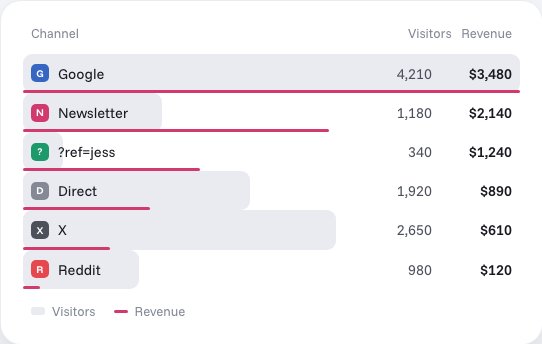
What you get is a live view of who is on, where they came from and what they did. For forms, set Post-Submit to redirect to a thank-you page and add a page-visit goal. Button blocks can't take attributes, so a Code block holds a link with a data-goal (custom goals). Squarespace doesn't allow this code on Commerce checkout pages, so Stickybeak can't receive order amounts there; counting an order-confirmation page visit on your domain is the workaround. For why a live view matters, see real-time website analytics, and for tagging your campaign links, UTM parameters explained.
If your Squarespace numbers look wrong
- Wait for the refresh. Squarespace says reports can take up to three hours, and Google Analytics up to 24 hours at first.
- Test while logged out. Squarespace ignores you while you're signed in, and Stickybeak's install guide says to test logged out, not in the editor.
- Compare like with like. Squarespace's visits end at midnight and use a 30-minute cookie; Google Analytics 4 uses its own definitions. Pick the same dates and the same measure.
- Allow for consent and Do Not Track. With Cookie banner and Manage cookies enabled, Google Analytics cookies require consent, and measurement also depends on your consent-mode configuration. Do Not Track inflates Squarespace's visitor counts.
- Check your traffic sources. A big Direct share often means untagged links. See what direct traffic is, and bounce rate if the engagement figures puzzle you.
Questions
Where do I find analytics on Squarespace?
Open the Analytics panel from your site's dashboard and click any report to see its data. You can also see a lighter set of analytics in the Squarespace app for iOS and Android.
What does Squarespace Analytics show?
Visitor counts and how they change, page performance, where visitors are and where they came from, search keywords, sales and conversion reports, cart abandonment and RSS subscriber estimates. Which panels you see depends on your billing plan and whether your site is connected to a payment processor.
Can I use Google Analytics with Squarespace?
Yes. Squarespace has a built-in connection for Google Analytics 4. You create a property, copy its Measurement ID (it starts with G-), and paste it into the External API Keys panel under Developer Tools in your Squarespace settings.
How do I add Google Analytics to Squarespace?
Create a Google Analytics 4 property and copy its Measurement ID. In Squarespace, open Settings, then Developer Tools, then External API Keys, paste the ID and save. Squarespace says statistics can take up to 24 hours to appear in Google Analytics.
Why don't Squarespace Analytics and Google Analytics match?
The two tools count with different rules. Squarespace ends every browsing session at midnight and counts a visit as one session with a cookie that expires after 30 minutes, and visitors with Do Not Track on register as new visitors on every page. Google Analytics also depends on consent and blockers. Small differences are normal.
Does Squarespace Analytics count my own visits?
Not while you are logged in. Squarespace records visits with JavaScript in the browser and says its analytics ignore your activity while you are logged in to your site.
How long does Squarespace Analytics take to update?
Squarespace says data in its analytics reports can take up to three hours to refresh, so very recent activity may not appear straight away.
Can I add Stickybeak to a Squarespace site?
Yes, through Code Injection, which needs a Core, Plus or Advanced plan, or an older plan that included it such as Business or Commerce. Test it on your custom domain while logged out. Stickybeak is in early access.
Sources, checked 17 October 2026: Squarespace Help Center, Squarespace Analytics, Track your site traffic, Connect Google Analytics to your site and Analytics in the Squarespace app; Google Analytics Help, Squarespace: Set up your Google tag. Stickybeak facts: our Squarespace install guide.