Can a website owner see who visits?
A website owner can see how many people visit, which pages they read, where they came from and roughly which country or city they are in. Basic analytics does not reveal an anonymous visitor's name. Visitors can identify themselves by signing in or submitting their details.
Enter a site to see roughly how many visits it gets from Google, the countries they come from and the pages they land on.
TL;DR
- A website owner can see how many people visit, which pages they read, where they came from and roughly which country or city they are in.
- Basic analytics does not reveal an anonymous visitor's name.
- Visitors can identify themselves by signing in or submitting their details.
Stickybeak is live analytics for every site you own: who is on, where they came from and whether they bought anything. It is in early access.
Get early accessWhat a website owner can see about visitors
Every visit leaves a few traces, and analytics tools turn them into reports. Here is what you get, and where it comes from.
| You can see | How it's known | How far to trust it |
|---|---|---|
| How many visits and visitors | A script on the page reports each visit, usually with a cookie to tell new from returning browsers | Good, but blockers hide some visits, and "visitor" means a browser, not a person |
| Which pages they read | The script reports each page view | Good |
| Where they came from | The referrer the browser sends, plus any UTM tags in the link | Partial: a lot lands as direct traffic with no source |
| Country, sometimes city | The visitor's IP address, looked up in a location database | Country is reliable; city is a rough guess |
| Device, browser and screen size | The browser describes itself on every request | Good |
| What they did: clicks, sign-ups, orders | Goals and events you set up | Only what you set up |
If you run an online shop or a site with logins, you also know who bought or signed in, because they told you. That is the one route to a name: the visitor hands it over.
What an owner can't see
- A name, email address or phone number for an anonymous visitor. Nothing in a normal page request carries one.
- Which person is behind a browser. A cookie recognises a browser coming back. Two people sharing a laptop look like one visitor, and one person on a phone and a laptop looks like two.
- An exact address. MaxMind, a large IP location provider, says its data is "never precise enough to identify or locate a specific household, individual, or street address."
- Anyone using a blocker that stops your script. Those visits are missing from the report, though your server logs may still show them.
Google builds this limit into Google Analytics. Its policy prohibits sending personally identifiable information, such as names or email addresses, to Analytics, and it says Google Analytics 4 does not log or store IP addresses.
How to see who visited your website
You need an analytics tool on the site. Without one, the only record is your server's access log, which lists requests, not readable visits.
- Install an analytics tool. Google Analytics is free for most sites, and Stickybeak is another option. Either is one script tag on your pages.
- Open the live view. In Google Analytics 4 that is the Realtime report. It shows activity from the last 5 and 30 minutes, with the countries and pages involved.
- Check sources. The traffic acquisition report groups visits by channel: search, social, email, referral and direct. Our referral traffic guide explains how each is detected.
- Check places and pages. The demographic details report gives countries and cities. The pages report shows what visitors read.
- Leave yourself out. Exclude your own visits, or you'll be the most loyal visitor in the report.
The counts side of this, how many visits a site gets and how to find the number, is covered in how to check website traffic. This page sticks to who the visitors are.
In Stickybeak
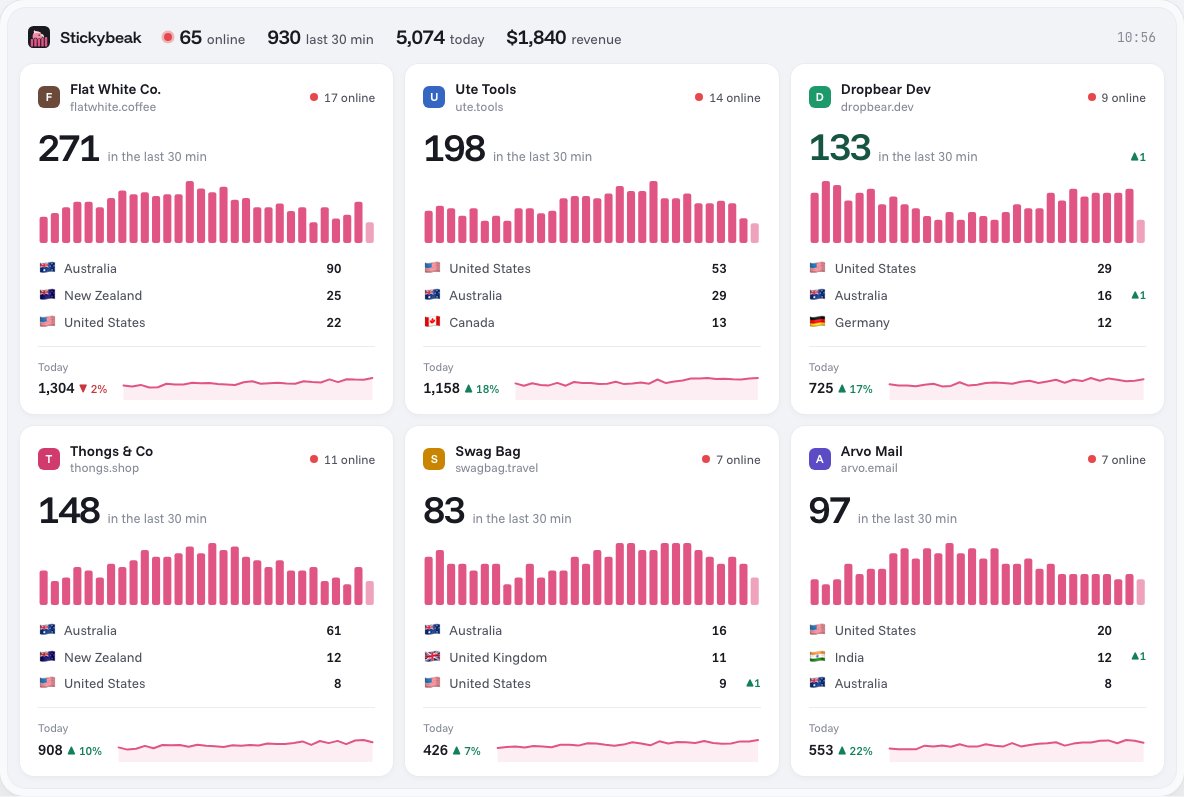
Stickybeak is live analytics for every site you own, and it's in early access. Its wall shows who is on each site now, with a per-minute chart and top countries. You can click any referrer, page, country or device to filter by it. Where a visitor buys, the order keeps its trail: the entry page, the referrer, every UTM tag and the pages read before buying. That is a detailed picture of what visitors did, which is the part an owner can honestly see.
Can you see the IP address of people who visit?
Your web server has to receive a visitor's IP address to send the page back, so server logs usually hold it. What the address tells you is limited:
- It identifies a network connection, not a person. Everyone in a household, café or office can share one.
- Mobile networks reuse addresses across many phones. MaxMind notes that mobile addresses "may be used by mobile phones across a large distance."
- With a VPN, the address belongs to the VPN's server. MaxMind says it can locate that server but not the end user.
- MaxMind's published estimates are 99.8% accuracy at country level and about 66% for US cities within a 50 km radius.
So the IP address is good for "which country", fair for "which region", and poor for "who". Whether you should store it at all is a privacy question, covered below.
Can you find out which company visited?
Sometimes. Company lookup tools, often sold to sales teams as visitor identification, match a visitor's IP address to a database of networks registered to businesses. When someone browses from an office network, the tool can guess the employer. The limits are the same IP limits as above:
- People working from home, on mobile data or on a consumer VPN usually don't appear on a company's network, so they go unmatched or match the wrong organisation. A corporate VPN can do the opposite and show the employer's network.
- The match names a network, not the person at the keyboard. A visit from a company's address might be an employee, a guest or a security scanner.
- Internet providers and cloud hosts own many addresses. A lookup that returns a provider tells you nothing about the customer.
Treat a company match as a lead worth a look, not as proof. If you sell to businesses, it can help you prioritise who to contact. If you run a blog or a shop, it rarely matters.
Can a website track who visits it?
A website can track a browser. With a cookie, it recognises the same browser coming back and links its visits together. It sees where that browser came from, which pages it read and what it did. That doesn't name anyone.
The visitor becomes a named person when they log in, buy something, fill in a form, or click a link in an email you sent them (if your email tool adds an identifier to the link). Everything else is a profile with no name on it. In standard mode, Stickybeak sets three first-party cookies on your own domain: a visitor ID, a session ID and a session count. The docs list them.
The referrer works the same way. MDN explains that browsers send the page a visitor came from in the Referer header, and that it can be trimmed or left out. The referrer identifies a source URL. That URL can leak personal details or identifiers, so keep those out of URLs and analytics.
Is it legal to see who visits your website?
Counting visits is routine. What matters is whether you collect personal data, and that depends on where your visitors live. This is general information, not legal advice.
- Under the EU's GDPR, an IP address can count as personal data. Privacy International explains that Court of Justice of the European Union cases, including Breyer v Bundesrepublik Deutschland, treat IP addresses as personal data when they can be linked with other information that identifies the user. The UK's Information Commissioner's Office calls them online identifiers.
- If you use an analytics tool that stores IP addresses or sets cookies, your privacy policy should say so, and some places require consent first.
- If you run a company lookup tool, you are working with that same data, so check the rules for your visitors' countries before you switch it on.
- Tell visitors what you collect and why, and keep as little as you need.
The PII examples guide lists what counts as personal information, and what to keep out of your analytics.
Questions
Can a website owner see who visits?
An owner can see how many people visit, which pages they read, where they came from, and roughly which country or city they are in. An owner can't see a visitor's name or email address from analytics alone. The exception is a visitor who gives those details, for example by logging in or filling in a form.
How can I see who visited my website?
Install an analytics tool such as Google Analytics or Stickybeak, then open its real-time and traffic source reports. You will see visits, pages, sources and countries. You will not see names unless visitors identify themselves on your site.
Can I see the IP address of people who visit my website?
Your web server receives every visitor's IP address to answer the request, so server logs usually hold them. Google says Google Analytics 4 does not log or store IP addresses. An IP address is not a name, and it can be shared by many people or point to a network rather than a person.
Can I find out which company visited my website?
Sometimes. Company lookup tools match a visitor's IP address against a database of networks registered to businesses. It can work when someone browses from an office network. It usually fails for people on home broadband, mobile data or a consumer VPN, while a corporate VPN can expose the employer's network. Either way, the match is a guess about the network, not proof of who was at the keyboard.
Can a website track who visits it?
A website can recognise the same browser coming back by using a cookie, and it can follow what that browser does on the site. That is tracking a browser, not knowing a person. Putting a name to it needs the visitor to log in or hand over their details.
Is it legal to see who visits my website?
Counting visits is common and lawful in most places, but the rules for personal data depend on where your visitors are. Under the GDPR an IP address can count as personal data. Check the rules that apply to you and say what you collect in your privacy policy.
Can I see who viewed my website on my phone?
You can see that phones visit, because analytics reports the device type. You can't see which person owns the phone. Mobile networks share IP addresses across many people, so even the location is approximate.
Sources, checked 16 October 2026: Google Analytics Help, Best practices to avoid sending PII and IP masking in Analytics (GA4 does not log or store IP addresses). MaxMind, Geolocation accuracy (limits and accuracy estimates). Privacy International, Are IP addresses personal data?. MDN Web Docs, Referer header.