Google Analytics MCP tools: run_report, run_realtime_report and the rest
Google's Analytics MCP server lets an AI assistant read your GA4 data. Use run_report for historical reports, run_realtime_report for live activity and run_funnel_report for progression between steps.
TL;DR
- These are the tool names in Google's official Google Analytics MCP server. An AI assistant calls them to read your GA4 data. You see the raw name when the call failed or was shown instead of run.
- run_report reads historical data, run_realtime_report reads live data, run_funnel_report reads funnels, and four more read account, property, custom field and Google Ads link details.
- If you only want live visitors and revenue by channel, you don't need the API: one script tag in Stickybeak shows live visitors, and revenue by channel once you send purchase events (Solo plan or above).
Stickybeak is live analytics for every site you own, set up with one script tag. It is in early access, with a free plan and paid plans from US$20 a month.
Get early accessThe tools at a glance
The server is googleanalytics/google-analytics-mcp. It is read-only by default and talks to two Google APIs: the Google Analytics Admin API and the Google Analytics Data API. Seven of its tools only read, and they are the ones this page covers.
| Tool | What it does |
|---|---|
get_account_summaries | Lists your accounts and properties |
get_property_details | Returns details about one property |
run_report | Runs a standard report over a date range |
run_realtime_report | Runs a realtime report |
run_funnel_report | Runs a funnel report |
get_custom_dimensions_and_metrics | Lists a property's custom dimensions and metrics |
list_google_ads_links | Lists the Google Ads accounts linked to a property |
Every tool except get_account_summaries takes a property_id, either a number or a string like properties/123456. Find yours with get_account_summaries.
get_account_summaries
get_account_summaries retrieves information about your Google Analytics accounts and properties. It takes no parameters. An assistant usually calls it first, to find the property_id the other tools need.
get_property_details
get_property_details returns details about one property. Its only parameter is property_id (required).
run_report
run_report runs a Google Analytics Data API report: the historical numbers, such as sessions by channel last month. Its parameters:
property_id,date_ranges,dimensionsandmetricsare required. Dimensions and metrics are lists of names, for examplesessionDefaultChannelGroupandsessions.- Optional:
dimension_filterandmetric_filter(Data API FilterExpression objects),order_bys,limit,offsetfor paging,currency_code(ISO 4217) andreturn_property_quota.
If the assistant doesn't know which custom fields your property has, it should call get_custom_dimensions_and_metrics first.
run_realtime_report
run_realtime_report runs a realtime report: what is happening on the property now, rather than over a date range. Google Analytics 4's Realtime report covers the last 30 minutes (see real-time website analytics). Its parameters:
property_id,dimensionsandmetricsare required. The repository says dimensions and metrics must be realtime ones, so a name that works inrun_reportcan fail here.- Optional:
dimension_filter,metric_filter,order_bys,limit(a positive integer up to 250,000) andreturn_property_quota. - The tool also exposes an
offsetparameter, but a nonzero value currently fails: the wrapper setsoffseton the request, and the Data API's realtime request has no such field. Leave it unset. - There is no
date_rangesparameter. That is what separates it fromrun_report.
run_funnel_report
run_funnel_report runs a Data API funnel report, which shows how many people get from one step to the next. Its parameters:
property_idandfunnel_steps(a list of steps, each with a name and filter criteria) are required.- Optional:
date_ranges,funnel_breakdown,funnel_next_action,segmentsandreturn_property_quota.
get_custom_dimensions_and_metrics
get_custom_dimensions_and_metrics returns a property's custom dimensions and custom metrics as two lists, custom_dimensions and custom_metrics. Its only parameter is property_id (required). Use it before run_report when a report needs a field you defined yourself.
list_google_ads_links
list_google_ads_links returns the links from a property to Google Ads accounts. Its only parameter is property_id (required).
Two more tools in the repo: annotations
The repository also has list_property_annotations, which reads the notes left on a property for dates or periods, and create_property_annotation, which writes one. The second needs the --allow-write flag and the analytics.edit scope. Everything else needs only https://www.googleapis.com/auth/analytics.readonly, plus Application Default Credentials.
When an assistant prints the tool name instead of running it
If you see run_report or run_realtime_report in the chat and no numbers, the assistant named the tool but the call did not run or did not return. Try these in order:
- Ask again and tell it to run the tool and show the rows.
- Check the Google Analytics MCP server is connected in your assistant's tool or connector settings.
- Check the Google Analytics Admin API and Data API are enabled in the Google Cloud project your credentials belong to.
- Check your credentials carry the
analytics.readonlyscope and can see the property. Runget_account_summariesto confirm the property is listed. - If the error is about a field, use a realtime dimension or metric for
run_realtime_report.
These steps are general. Each assistant reports tool failures in its own way, so read the message it shows.
See live visitors and revenue by channel without the API
The usual reasons to call run_realtime_report and run_report are two questions: who is on my site right now, and which channel brings the money. Stickybeak answers both on screen, with no Google Cloud project, credentials or tool calls. One script tag gives you live visitors; revenue needs a purchase event sent after each order.
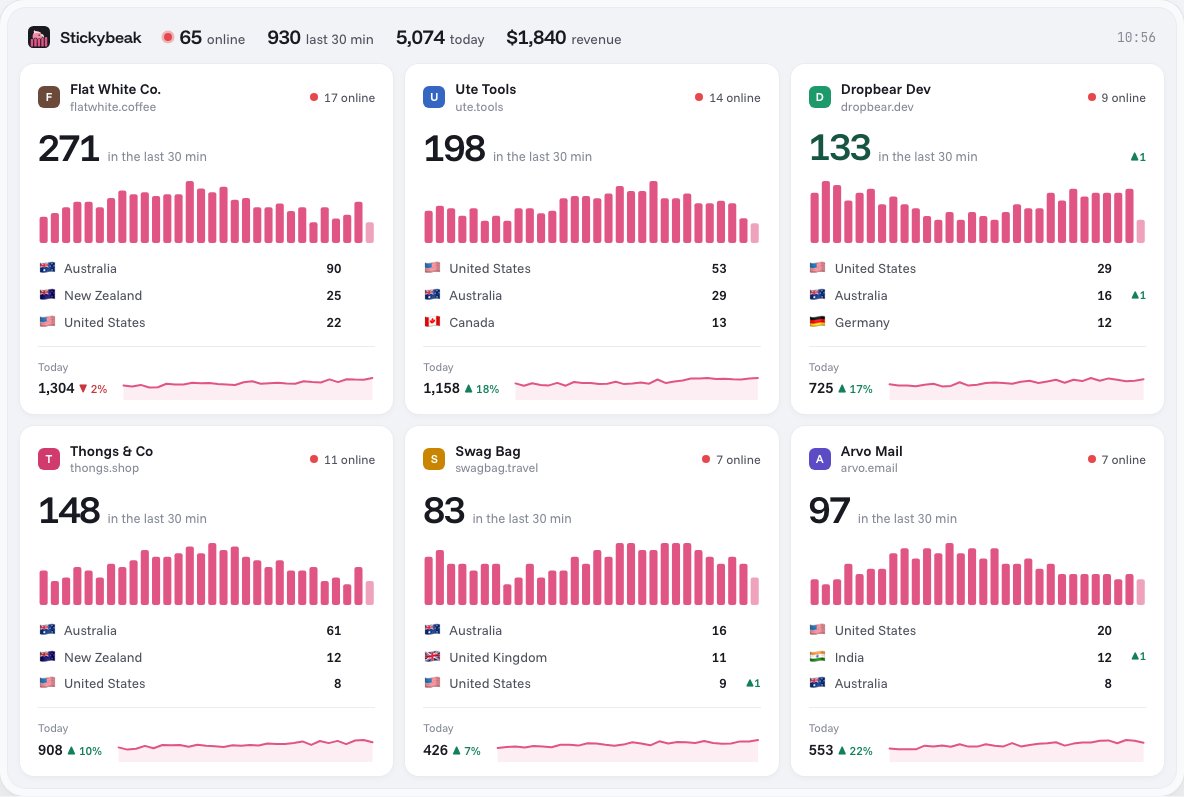
- Live visitors. The wall shows every site you own on one screen, with visitors now, a per-minute chart and top countries.
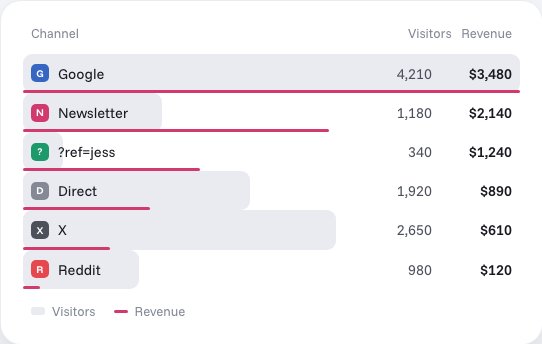
- Revenue by channel. Revenue is tied to the channel, campaign or
?ref=code it came from. Revenue attribution needs purchase events with server-verified order values (see revenue attribution) and starts on the Solo plan ($20 a month); the free plan covers up to 10k pageviews a month.
Stickybeak does not have an MCP server yet; its pricing page lists MCP as on the way. If you want an assistant to query Google Analytics today, the server above is the route. See Google Analytics alternatives if you are weighing a switch.
Questions
What is run_realtime_report?
run_realtime_report is a tool in Google's Google Analytics MCP server. An AI assistant calls it to run a realtime report through the Google Analytics Data API for one property. It needs a property_id, realtime dimensions and realtime metrics.
Why did my assistant print run_report instead of showing numbers?
Usually the call did not run or failed, and the chat showed the tool name instead of the result. Check that the Google Analytics MCP server is connected, that the Google Analytics Data API is enabled and that your credentials have the analytics.readonly scope, then ask again.
Is the Google Analytics MCP server read-only?
By default, yes. The repository says write capabilities are optional: create_property_annotation needs the --allow-write flag and the analytics.edit scope. The seven tools on this page only read.
Does Stickybeak have an MCP server?
Not yet. Stickybeak's pricing page lists MCP as on the way. Today you read live visitors and revenue by channel in the Stickybeak dashboard.
Sources: tool names, parameters, scopes and setup read on 31 October 2026 from the googleanalytics/google-analytics-mcp repository (its README and the source files for each tool). Stickybeak facts come from this site's pricing page. The repository changes; if a name or parameter here is out of date, tell us and we will fix it.