Campaigns and attribution
Affiliate links
Affiliate tracking gives each partner a code that Stickybeak remembers, crediting the latest partner for later goals and orders.
Create affiliate link tracking
https://example.com/pricing?ref=jane
https://example.com/blog/launch?ref=jane&utm_source=youtube&utm_medium=video| Rule | Value |
|---|---|
| Accepted parameters | ref, via, aff, affiliate, in that order |
| Code | Up to 64 letters, digits, -, _ or .; stored lowercase |
| Credit | Latest affiliate; 60 days by default, configurable from 1–365 days |
No registration is required before the first click. Credit stays in that browser, so it does not cross devices.
Channels and affiliates
Without utm_source, the visit uses the Affiliate channel. With UTM tags or an ad click ID, that visit keeps its campaign channel while the affiliate still receives separate credit.
Register a partner
Open ⚙ Settings → Affiliates. Add the code, name and optional commission rate from 0–100%.
| Unregistered code | Action |
|---|---|
| A real partner | Register, then add its name and commission |
A directory tag such as producthunt | Ignore; it becomes the visit source instead |
Read the report
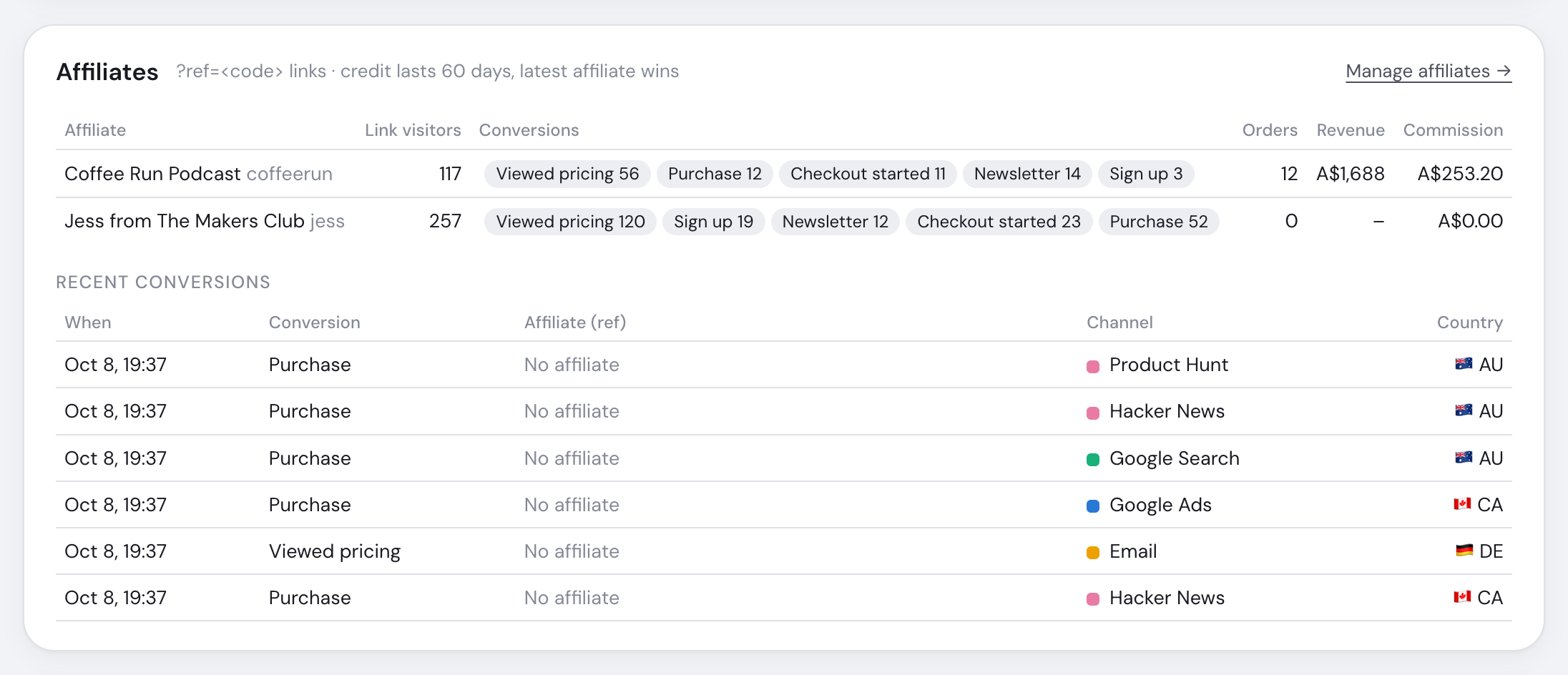
Rows show link visitors, goal conversions, orders, revenue and calculated commission. Recent conversions show the credited affiliate, click time and landing page.
For 90 days and longer, link visitors cover the most recent 32-day raw-data window; orders and revenue cover the full range. Stickybeak reports commission but does not handle payouts or affiliate sign-up.
Privacy mode removes affiliate parameters, so no affiliate is credited.