Using the dashboard
How realtime works
Real-time analytics shows live website visitors on the wall and Right now panel within seconds. This page explains how those live counts work.
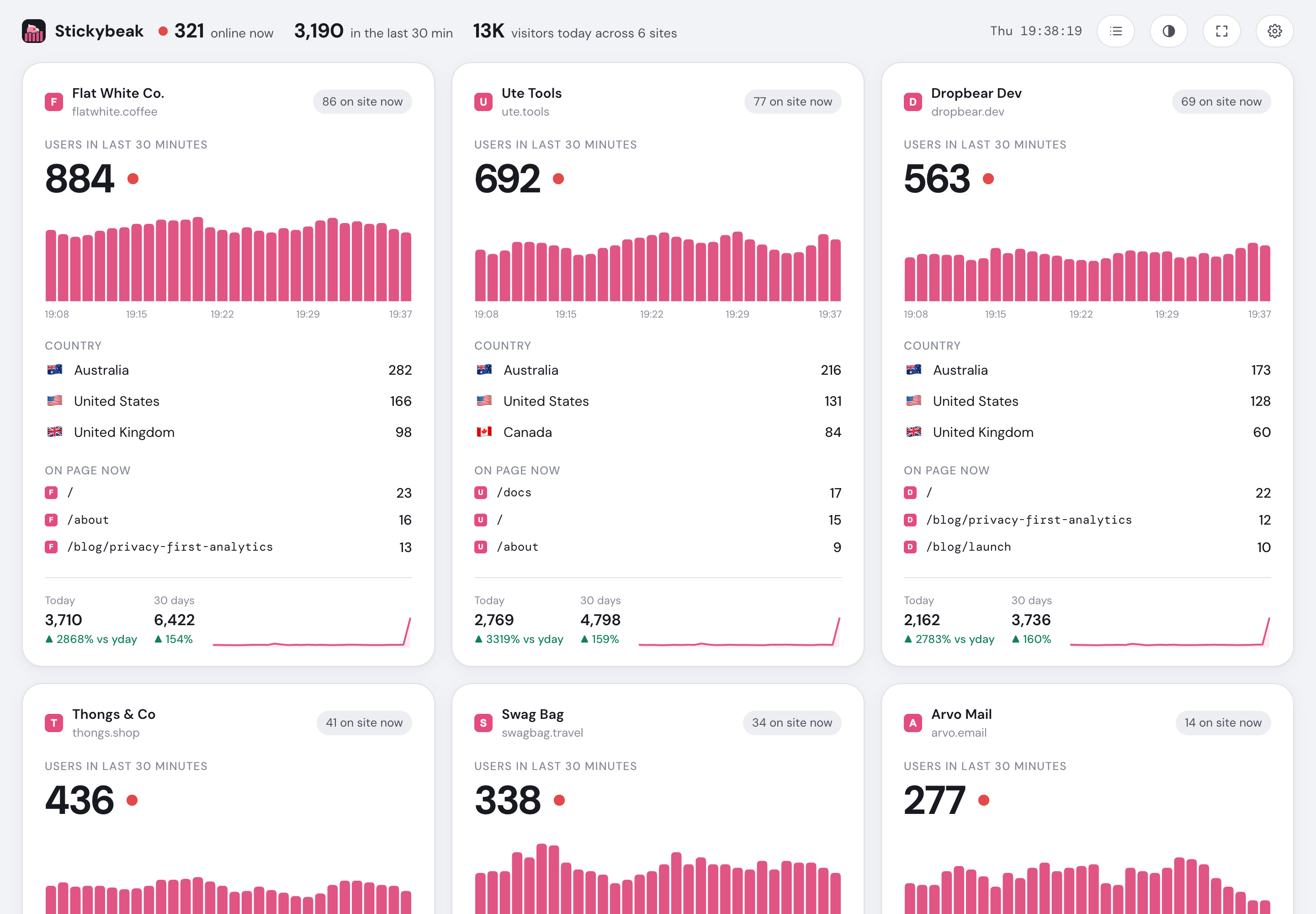
- Live totals across every site
- Switch between card and list views
- Fit every card to the screen
- One complete live summary per site
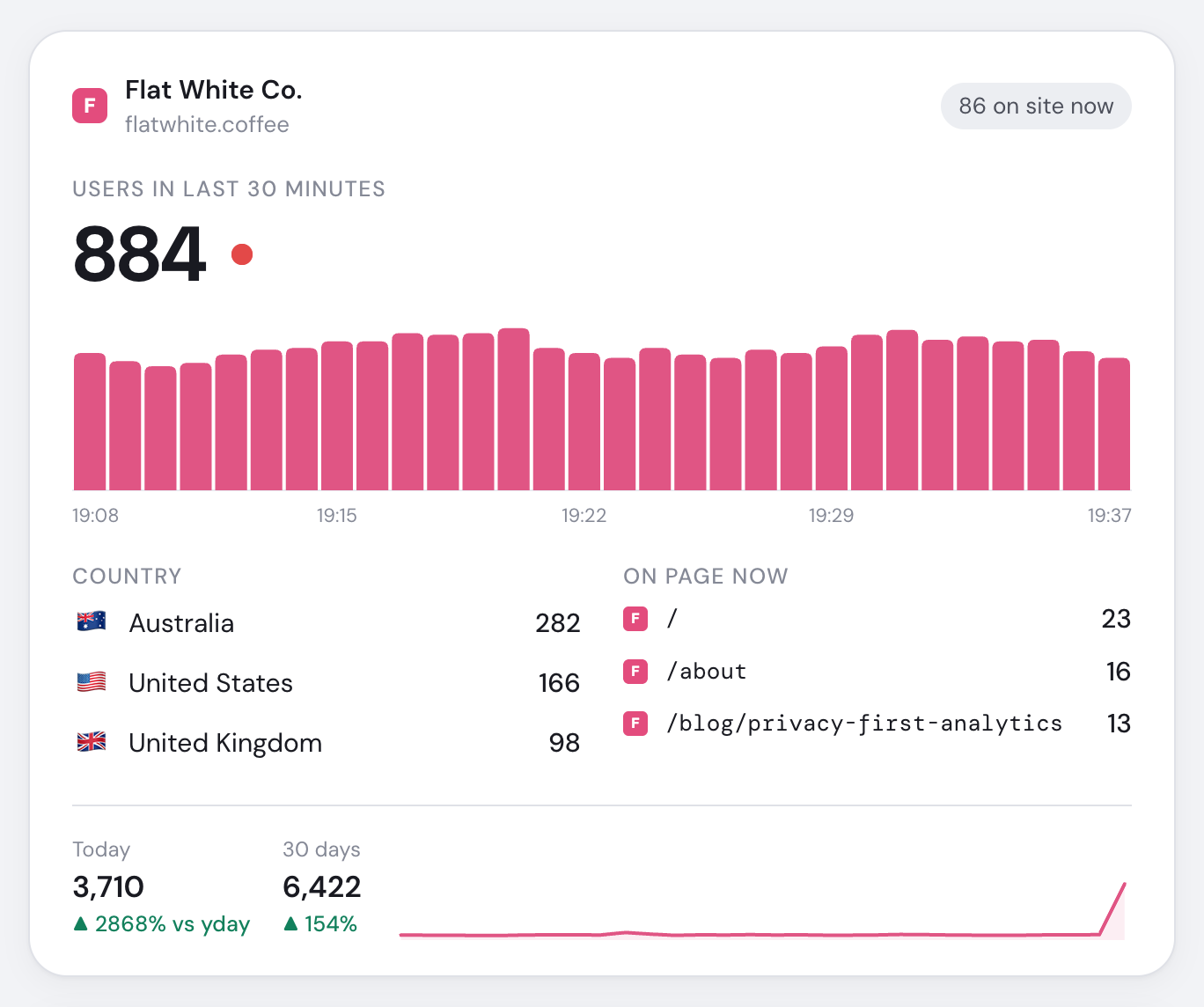
- Site identity and dashboard link
- Visitors on this site now
- Visitors active during the last thirty minutes
- Active visitors for each recent minute
- Top countries and changes since opening
- Pages visitors are viewing now
- Today versus yesterday and thirty-day trend
Real-time website analytics definitions
| Number | Definition |
|---|---|
| On site now | People who sent a pageview, goal or presence ping in the last 60 seconds. The big number in Right now |
| Last 30 minutes | Unique people active in the current minute and previous 29. The smaller number under it |
| Minute bars | Unique active people per minute; newest at the right |
| On page now | The current page of each online person |
| Latest activity | Last 15 pageviews and goals, including purchase amounts |
The globe
Switch Right now from Chart to Globe to see everyone from the last 30 minutes where they are. The choice is remembered in that browser.
- Pink, pulsing: someone there is on the site now.
- Grey: they were here earlier in the half hour.
- A number: more than one person at that spot (the people on the site now, or everyone if nobody is).
The globe faces the place with the most people on the site now and drifts back there a few seconds after you drag it. Click a pin to list who's there: when they were last active, the page they're on, where they came from, their device, pages viewed and time on site, with a link to open the visit.
Places come from Cloudflare's estimate of each visitor's location, worked out from their network and rounded to a tenth of a degree (about 11 km), so expect the right city rather than the right street. Mobile networks and VPNs can put someone in a nearby or different city. IP addresses are never stored. The globe's map is only downloaded when you pick it.
Presence
An active, visible tab pings every 20 seconds. Returning to it pings immediately. Pings do not add pageviews; they keep live presence and one-page session time accurate. Activity stops after 30 minutes without scrolling, clicking, typing, mouse movement or touch.
From browser to dashboard
The tracker sends activity
Pageviews, goals and presence reach the live hub.
The hub keeps 30 minutes
It also batches visits to the database about once a second.
A WebSocket pushes snapshots
The dashboard receives your workspace only. It reconnects automatically and polls while repeated retries fail.
Stored Today figures refresh about once a minute, so live activity appears first. Reload after adding a site because the connection's site list is fixed when it opens.
Not seeing yourself?
Visits from a network someone in your workspace has signed in to Stickybeak from are labelled as your team and left out of every live number and the globe. See Exclude your own visits. localhost, stickybeak:ignore and ignored paths send nothing. See Verify your install.